Latest Post
Showing posts with label Reviews. Show all posts

Download spt v0.6.0 – Simple Phishing Toolkit

Written By Unknown on Thursday, 26 July 2012 | 10:32

spt is a simple concept with powerful possibilities. It is what it’s name implies: a simple phishing toolkit.

Download spt v0.6.0

The basic idea we (the spt project) had was that wouldn’t it be cool if there were a simple, effective, easy to use and free (most importantly!) tool that information security professionals could use to evaluate and train what we all know is the weakest link in any security minded organization: the people.

Since the founders of the spt project are themselves information security professionals by day (and possibly either LOL cats or zombies by night), they themselves faced the frustration of dealing with people within their own organizations that claimed to know better, but 9 times out of 10 fell for the most absurdly obvious phishing emails ever seen. A malware outbreak here, a stolen password and loss of critical organizational data there and the costs of dealing with the results of phishing can get to be astronomical pretty darn quickly!

Enter spt. spt was made from scratch, like a baby (or maybe a zombie) with the goal of giving over-worked and under-staffed information security professionals a simple tool (more like a framework, as we hope to add more features over time) that could be used to identify and train those weakest links. spt is a fully self-contained phishing email toolkit that can be installed, configured and phishing in less than 15 minutes. Its design is modular and open-ended allowing for future expansion and additional features via easy to snap-in modules that are simply uploaded in the administration dashboard. Why not try out spt today and see who your weakest link is?

You can download spt here:

sptoolkit_0.60_zip.zip

Or read more here.

Apple iPhone 4S, A Comprehensive Review

Written By Unknown on Wednesday, 26 October 2011 | 06:00

Review Apple’s design language is easily recognisable: clear glass or plastic that’s spray-painted from the inside, a frequent use of aluminium, stainless steel and any colour so long as it’s white or black. But the new iPhone takes this familiarity further, by making the iPhone 4S almost identical to last year’s iPhone 4.

Apple's iPhone 4S: external tweaks are subtle, the main changes are internal

Of course, it’s not the first time this has happened – the 3G was followed by the matching 3GS. But for the millions who had been eagerly anticipating an iPhone 5 since, ooh, June this year, it came as a big disappointment. So, was that disappointment justified or should you upgrade without hesitation? Read on.

The cosmetic differences are few so you won’t need to hear much about the iPhone 4S’s design. It’s the same slim, solid and classy machine with components precision-tooled to the micron, not the millimetre, and the same buttons as every iPhone: a home button, volume, ringer and power buttons.

Some older cases might not fit due to a slight shift of the buttons

One change is the position of the black lines on the steel band that edges the phone. Those black lines are functional, and are indicative of a whole new antenna. This aims to address the dropped calls and spotty signal of last year’s model. Not everyone suffered from a poor signal but if you did, then you’ll be pleased to hear the new set-up works splendidly, giving the iPhone something which performs like one of the strongest antennas around.

So it reliably makes and receives calls – hurrah! Signal strength and battery life, the bare minimum for a phone, are both strong with clear voice quality. Daily charges are still recommended but it won’t need a lie-down by lunchtime, unlike some smarties. So what else is new?

The camera has been overhauled optically and captures stills at 8Mp

The only other cosmetic alteration is situation of the volume buttons and ringer switch. They’ve also moved just enough to mean that some cases, including early editions of Apple’s own bumper, won’t fit. The buttons match the positions on the Verizon iPhone 4 sold in the US and newer bumpers are designed for both versions. But if you’re planning to recycle last year’s case, depending on when you bought it, it may not fit.

Internal affairs

Other changes, and there are several, are all internal. First of all, there’s a new processor. Well, not quite new, it’s the A5 chip found in the iPad 2. Just as it made the second iPad much faster than the first, the peppy A5 ensures the iPhone fast and responsive. Though the iPhone 4 rarely kept you waiting for long, here applications launch in a trice and content is downloaded fast – though this may be partly due to the improved antenna, too.

The A5 CPU has yet to show its strengths with third party apps

The CPU is swift, but its potential has yet to be fully realised yet – Apple promises performance that’s twice as fast but graphics that are seven times better. We need to wait for the improved games apps – that developers are coming up with now – to really notice the difference. Since the iPhone continues to have the one of highest pixel density ratings of any mobile, these visual treats should be worth waiting for.

The camera has also had an upgrade. It’s now 8Mp, which is good but not exceptional. The differentiators come in other forms: where the iPhone 4 had an array of four lenses, the 4S has five, promising sharper detail. The aperture is wider (f2.4) and the sensor has its wiring hidden around the back instead of on the front, where it is on most sensors. Both these aim to suck more light in through the lens, improving picture quality.

Sample Shots


Wide mode – low resolution 

And the processor is no slouch here, either, speeding up autofocus and rapidly readying the snapper for the first shot with subsequent photos captured even more quickly. Features like face recognition, auto exposure and auto focus controlled by one setting are now available. Not all of these are firsts, but they work well.

The new operating system, iOS 5, helps you get snapping more quickly by including a shortcut to the camera from the lock screen. You’ll find a more detailed exploration of the new software, which is also available on the iPhones 4 and 3GS, here.


Vocal performance

Much has been made of Siri, the new key feature launched with the iPhone 4S. It’s not the first voice-recognition application but just as FaceTime was far from the first video calling application, Apple aims to provide the best voice interface. Siri was available in the US App Store already, but those servers no longer respond if you launch that app now. Apple liked the company so much, it bought it, as Victor Kiam used to say.

Siri originally appeared on the App Store until Apple acquired it

So does it work, and do you need it? Well, it mostly works pretty well. Its microphone does best in quiet environments and worst when it’s noisy or you’re trying to show it off to someone. Then it fails to understand what you’ve said.

In the UK, it’s limited for now because mapping and business data doesn’t extend beyond the States, though this will follow. So you can’t ask directions or distances between places as you can in America. Switching to US English and adopting your best accent works splendidly… but only if you’re in the US at the time.

Voice commands can be executed for any number of tasks

It can still do a lot. Say “Text my wife” and it will. First time, of course, you have to tell it which of your contacts is your wife – come on, it’s not psychic – but then it’ll remember. Then dictate your message and it’ll send it. Ask it to remind you to pick up the milk when you leave the office and it’ll use the phone’s location information from GPS and Wi-Fi to ping you a reminder as you walk out the door.

Siri is integrated throughout the phone’s features, and third parties can build functionality into their apps, so its potential may grow quickly. Sometimes it’s quicker to type a message, but for hands-free use when driving, say, it’s decidedly useful. Especially since you can talk to it very freely. Ask if it’s chilly tomorrow and it knows to seek out weather information and comment on whether tomorrow’s temperature qualifies as warm or cold.

The iPhone 5 could be some way off, so it's make your mind up time

Or ask it for share values and you can follow up asking it to compare two stocks. It’s highly sophisticated and though at times it seems to be a glorious, cool gimmick, this will change. One thing that hasn't changed though, is that the iPhone still doesn't offer an FM radio – something that appears on just about all competing smartphones.

Verdict

So should you buy an iPhone 4S? For 3GS users, the answer is an emphatic yes. It’s less clear-cut for iPhone 4 owners, especially if you have a contract to buy your way out of. But if you suffered from poor call quality before, the 4S will restore your faith in the iPhone. Even if you didn’t, the upgraded performance and coolness of Siri and the improved camera are pretty compelling.

If you’re wary of buying the 4S in the belief that a radically different iPhone is on the horizon, the fact is, beyond Infinite Loop, nobody knows – and really, don’t believe anyone who claims otherwise.

Apple's new talker looks the same on the outside, but its dual-core CPU delivers significant changes in capabilities.

Suggested Price: £499 (16GB), £599 (32GB), £699 (64GB)

More Info: Apple's iPhone 4S page

Nitro PDF Reader 2 Final Released

Written By Unknown on Tuesday, 21 June 2011 | 06:11

When it comes to pdf readers Windows users have lots of choices. From Adobe Reader over third party alternatives such as Sumatra or Foxit Reader to built-in pdf readers in browsers such as Google Chrome. When it comes to creating pdf documents, the choice shrinks significantly.

Nitro PDF Reader has received lots of praise in the past for its pdf viewing and creating capabilities. The developers today have released version 2 final of the program. A lot has changed compared to the previous version. Among the new features are browser plugins for Mozilla Firefox, Google Chrome and Internet Explorer, a new thumbnail handler for Windows Explorer (32-bit) to generate better pdf previews and support for layers and rendering transparency in pdf fles.

The Nitro Reader features include abilities to fill out and save PDF forms, stamp a signature on a PDF, extract text and images, comment, highlight or strikeout text, and more. New enhancements to 2.0 include:
  • QuickSign – import a scanned image of your handwritten signature to sign documents electronically in just seconds
  • Microsoft Office Interface – Unlike other PDF Readers, the Nitro PDF Reader uses the same interface as Microsoft Office products, so users know exactly where to find things
  • It’s faster – files open instantly, PDFs are created 4x times faster
  • It’s lighter – using much less RAM in its runtime, even with multiple PDFs open
  • Files are lighter – now the PDFs you send are half the size
  • Browser integration – you can open and save PDF in popular browsers like IE 9.0 and Firefox 4.0 without having to switch back and forth between software programs

According to its developers, Nitro PDF Software is now creating pdf documents up to four times faster than its predecessor. It also lighter on computer memory and creates pdf documents that are lighter in size. A short test opening some pdf documents showed that Nitro PDF Reader 2 is about as fast as the lightweight pdf reader Sumatra when it comes to opening pdf documents. Keep in mind that the program offers additional functionality for viewing and creating pdf documents, that Sumatra does not offer.


Several issues have been resolved in the new version, including a memory leak that increased the memory usage during usage and a issue where multiple Nitro processed remained running on the system.

You can access the release notes of the new version here, provided in a pdf document.

Nitro PDF Reader 2 is available for 32-bit and 64-bit Windows client and server systems. The developers recommend one Gigabyte of ram and at least 300 Megabytes of available hard drive space.

You can download the latest version of Nitro PDF Reader 2 from the developer website. It is offered as a 32-bit and 64-bit version.

Source: Ghacks

6 Advanced CD/DVD Data Recovery Software

Written By Unknown on Monday, 20 June 2011 | 11:11

cd-dvd
Blank CDs and DVDs have been around for quite some time now and their limited life span means that many users will eventually run into accessibility problems. With age come problems to read files from the CDs or DVDs. The only option in this case is to make use of data recovery software to save those files to storage device before they become completely unrecoverable.

Why can files become unreadable on optical media? Burned CDs and DVDs suffer from material degradation. And most disks also suffer from oxidation, not to mention scratches and other forms of physical contacts. The average lifespan of such disks is said to be ten years.

This overview looks at free solutions to recover files from CDs and DVDs.

It should be obvious that data that is not there anymore physically cannot be read by even the best DVD or CD recovery software. Sometimes though files can not be read by the user in Windows, while they are largely recoverable on the byte level. Basically, data recovery software copies every readable byte of the optical disks to another storage device.

IsoBuster


What the developer says:
It supports all optical disc formats and all common optical disc file-systems. Start up IsoBuster, Insert a disc, select the drive (if not selected already) and let IsoBuster mount the media. IsoBuster immediately shows you all the tracks and sessions located on the media, combined with all file-systems that are present. This way you get easy access, just like explorer, to all the files and folders per file-system. Instead of being limited to one file-system that the OS picks for you, you have access to “the complete picture”. Access data from older sessions, access data that your OS (e.g. Windows) does not see or hides from you etc.
IsoBuster is available as a free and professional edition. The free version has several limitations, largely lack of HD DVD, Blu-Ray and file format support.

The program tries to install a toolbar during installation, make sure to cancel that before continuing. The program is simple to use. It will automatically recognize a CD or DVD that has been inserted into the drive. The sessions, tracks folders and files are displayed in the program interface.

Here it is possible to navigate the menu structure, and extract individual files or files from folders from the disk. IsoBuster displays a Save As dialog and extracts the data to the selected disk.

Several recovery options can be configured in the preferences. This includes the maximum number of retries, sorting criteria, file system specific settings or image files handlings. IsoBuster can load CD and DVD images as well, which is the recommended way of handling recoveries.

CD Recovery Toolbox


What the developer says:
CD Recovery Toolbox Free – repair damaged CD disks
CD Recovery Toolbox tool was developed for recovering damaged files from different disk types: CD, DVD,HD DVD, Blu-Ray, etc. You can use it to restore information lost as a result of some mechanical damage of the disk (scratches, chips, different spots on thesurface) or as a result of incorrect recording.
This program is very easy to use. CD Recovery Toolbox supports recovery of CD, DVD,HD DVD and Blu-Ray disks. It begins with the selection of the drive, and the output directory. The program then reads the files from the disk and displays them in a file browser.

Here it is possible to select the root folder, or one of the subfolders of the disk for recovery. A click on Save reads the data from the disk and saves it on the selected storage device.

CD Check


What the developer says:
As your CD and DVD collection grows, there are two important problems you face – do your CDs and DVDs still work? What can you do when a CD or DVD starts to have problems? These are crucial questions since the discs are used to store valuable files like email, home movies, photographs, business/tax records and music. The solution is to use a free program like CDCheck. It can scan most CDs in a few minutes to tell you if the data is OK – this way, you don’t have to find out the hard way that there is a problem. Plus you can use the time it takes for a scan to complete as indicator of the CD or DVDs overall health – even though files may not be recorded as damaged, slower results normally indicate a CD that is on the way out (expect longer times if there are more files on the CD).
If a CD or DVD is showing files with damage or you can no longer read a file in a drive, CDCheck can be switched to recovery mode and make a full sweep of the CD or DVD, recovering lost files along the way. When parts of a file can’t be fully recovered, the program will still recover any salvageable fragments. Many file formats such as Zip, TIFF and JPEG can still be used if incomplete (success of this technique varies, depending on the damage). Most zip tools have a ‘repair archive’ function, and a standard graphics editor can help repair damage to photographs caused by missing fragments.
CD Check is a software that needs to be registered on the developer’s homepage before it is free to use for a lifetime. The program can check a disk for read errors, which the other programs in this overview cannot. The time of each check depends on the disk and the speed of the drive.

The other options are to compare directories, for instance a directory on the CD or DVD with a local directory, and to recover files from the disk. For comparison purposes, hashes are generated.

DVD Disaster


What the developer says:
CD, DVD and BD media keep their data only for a finite time (typically for many years). After that time, data loss develops slowly with read errors growing from the outer media region towards the inside. 
Archival with data loss protection 
dvdisaster stores data on CD/DVD/BD (supported media) in a way that it is fully recoverable even after some read errors have developed. This enables you to rescue the complete data to a new medium. 
Data loss is prevented by using error correcting codes. Error correction data is either added to the medium or kept in separate error correction files. dvdisaster works at the image level so that the recovery does not depend on the file system of the medium. The maximum error correction capacity is user-selectable.
DVD Disaster is not a typical data recovery software, as it can be used to prevent data recovery by adding error correction codes to optical disks. To create error correction codes a disk image is required. The program is able to create those disk images and create the codes. Those codes can then later be used to recover files from a disk.

Roadkil’s Unstoppable Copier


What the developer says:

Recovers files from disks with physical damage. Allows you to copy files from disks with problems such as bad sectors, scratches or that just give errors when reading data. The program will attempt to recover every readable piece of a file and put the pieces together. Using this method most types of files can be made useable even if some parts of the file were not recoverable in the end.
The program can be used as a daily backup system using its batch mode functions. A list of transfers can be saved to a file and then run from the command line to perform the same batch of transfers on a regular basis without having to use the GUI interface. The program supports command line parameters which allow the application to be run from schedulers or scripts so it can be fully integrated into daily server tasks.
Roadkill’s Unstoppable Copier can read data from any kind of disk. It tries to recovery files on a byte level, and can copy files partially because of this. This often means that files can still be accessed, especially if they are not binary.

Abyssal Recovery


What the developer says:
Abyssal Recovery can rescue corrupted or lost data from damaged, scratched, or defective CD and DVD discs. Abyssal Recovery can copy the files to another destination on your hard drive. Abyssal Recovery will skip the bytes which are not readable from file and copy all other bytes to extract maximum data. You can set the program to copy byte with byte to minimize the losses, or you can set a higher number of bytes to be copied once for a faster recovery.
Abyssal Recovery is a basic CD and DVD data recovery software that tries to rescue data from partially unreadable disks by copying all readable bytes to another storage device. It does not offer an advanced feature set as several of the other recovery solutions in this guide.

Verdict

Two of the tools in this review can be used to prevent data loss. Both CD Check and DVD Disaster offer the means to check data on disks regularly to ensure 100% readability of the data. DVD Disaster even offers a solution if data becomes unreadable.

For disks with corrupt data, IsoBuster is probably the prime choice. Even though it may make sense to use several tools for best recovery results.

Enjoyed the article? Then sign-up for our free newsletter or RSS feed to kick off your day with the latest technology news and tips, or share the article with your friends and contacts on Facebook or Twitter.

Playing Quake Live

Written By Unknown on Saturday, 18 June 2011 | 07:07

Back in the good old days of third person shooters, there were two contenders for the throne. In one corner Quake Arena by ID Software, in the other UT 99 by Epic Megagames. Both games shared lots of similarities, like being extremely fast paced multiplayer games with great community support and an extensive array of maps, weapons and other stuff.

You can re-live these days, at least if you happened to play Quake Arena, by heading over to Quake Live to play a remake of the game that stays in many regards true to its original. Probably the biggest difference is that Quake Live is played in a web browser. It is however unlike any of the standard browser games that you may have encountered.

Before you can play, you need to register a free account. The game is free to play by everyone, but offers additional features to paying premium users. They can for instance create Quake Live servers that they can control, or do not see advertisement when the maps load. For the beginning though, free is good and everything that you need to get started.

During installation, a plugin needs to be installed in the browser. Without the plugin, the game won’t load and you cannot play.

Once you have setup your account you have options to learn some techniques in a training center, practice offline against bots or jump right in and play against human opponents online.

Quake Live determines your skill during the first matches, and suggests matches based on those skills. You can override this easily by opening the match browser and clicking on the Customize link to customize the game selector.

Quake Live

Before you head out you may want to customize your character. You can select one of the available skins or change controls and game settings. Here you can enable full screen play which is highly suggested for the best gaming experience. You are otherwise stuck with a maximum resolution of 1024×768.

Quake Live

Quake Live keeps tracks of all kinds of statistics, like a player’s accuracy, frag to death ratio or wins. The developers have added an award system similar to achievements that have become popular in past years. The awards do not affect the game though.

Quake Live has a friend system which you can use to add all your friends to. This way it is a lot easier to play with your friends in the same games.

The game itself is extremely fast paced, even more so if you are used to modern first person shooters like Modern Warfare, Call of Duty or Battlefield. Think of those games with a 200% speed increase and you may come close to the speed of this game.

Quake Live


If you played Quake Arena back in the days, you will feel at home right from the start. Maps and weapons will feel familiar and give you a head start in matches against players who have to accommodate first. If you have not played Quake 3 Arena before, you are probably best of playing a few practice matches against bots, before you jump into multiplayer games with human opponents.

The game runs well in the browser. While I have a high-end PC and Internet connection, it is likely that it will run as well on standard systems. Players will find loads and loads of games at any time of the day, enough to keep them busy for months, if not years.

Why do not you head over to Quake Live to try it out for yourself?

Now if they only would make an UT Live, that would be awesome.

Acer Iconia Tab W500 Windows 7 Tablet Review

Written By Unknown on Monday, 6 June 2011 | 08:32

Despite the popularity of Apple’s iPad and the booming market for Android tablets, there are still plenty of Windows 7 tablets out there.  The latest is Acer’s W500 hybrid tablet, a 10.1 inch tablet based on a 1GHz AMD C-50 processor, 2GB of DDR3 ram and a 32Gb SSD.  It also comes (optionally) with a keyboard dock that allows you to turn it into a netbook.

Both iOS and Android are polished tablet operating systems, though there is still demand for Windows on tablets.  This might be because people want the power of Windows, they want to use their existing Windows software or perhaps because they’re getting ready to move to the next version of Windows next year.

SUPERAntiSpyware Professional Review

Written By Unknown on Sunday, 5 December 2010 | 08:05

SUPERAntiSpyware is available as a free and professional edition. Both editions are downloadable directly  from the developer website. Lets take a quick look at the differences between SUPERAntiSpyware Professional and SUPERAntiSpyware Free.

Both editions support the detection and removal of all sorts of malicious programs including malware, trojans, worms or keyloggers. Users can add files and folders to a whitelist so that they will not be processed during scans.

SUPERAntiSpyware Professional on top of this offers the following features that are not available, or limited, in the free edition:
  • Ability to repair HiJacked web browsers and system settings, e.g. resetting the home page, enabling the task manager, broken network connections or desktop policies.
  • A feature called First Chance Prevention which analyzes 50 critical points on system start and shut down to eliminate threats before they have a chance to infect the system.
  • Threat realtime blocking by monitoring the Windows PC and processes.
  • Registry protection against web browser hi-jackers and other threats.
  • Auto-scanning on application startup.
  • Automatic update checks and definition updates every 8 hours.
  • Daily definition updates.
  • System diagnostic to locate new threats on the PC.

SUPER AntiSpyware

SUPERAntiSpyware Professional Review

The security software displays a clean interface on startup. Users can press on buttons to perform manual operations. This includes scanning the system for harmful software, configuring scheduled scans, managing the quarantine, editing the program preferences and checking for updates. Update and license information are displayed there as well.

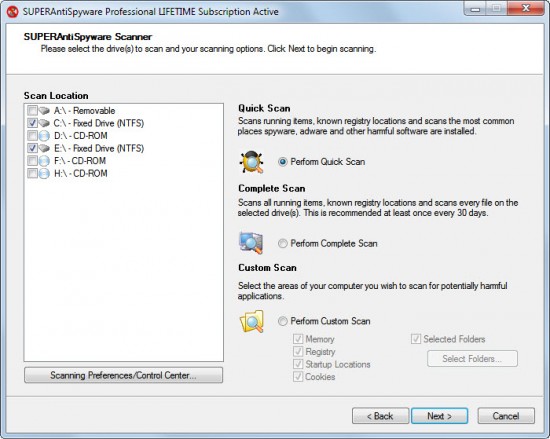
A click on Scan your computer opens the scan menu with options to scan the whole computer system or just a specific drive for malicious programs. SUPERAntiSpyware Professional users can perform a quick scan of the Windows PC, perform a complete scan or custom scan.

The quick scan scans all running programs and processes, critical Registry locations and the most common places on the connected hard drives for harmful software. The complete scan adds the selected drives to the scan list. Custom scan finally can be used to scan specific areas of the operating system (like the Registry or memory) and selected folders.

SUPER AntiSpyware

A system scan takes a while, depending on the speed of the PC and the selections that have been made. The quick scan took a few minutes to complete and results are displayed in detail on the results page. Each possible file and location found are categorized in groups and listed with their local path on the PC. It is possible to unselected items from being cleared, add items or locations to the list of trusted items, report false positives, manage the trusted items list or explain one of the detected items.

Especially the explain detected item can be helpful considering that it is not always clear why a file is being marked as being malicious. This loads a page on the SUPERAntiSpyware page with additional details about the selected item. It still may take more research to find out about a specific item. It is for instance a good idea to upload files to Virustotal for a second opinion.

All selected items will be removed by SUPERAntiSpyware Professional, and it may take a reboot of the system to clean them completely from the system. If it does a reboot is suggested by the security software to complete the process.

Scans can also be scheduled in specific intervals, for instance daily at a specific time or once a week.

SUPER AntiSpyware


All removed items are added to the program’s quarantine from where they can be restored or completely removed.

The control center offers extensive configuration options. Users should especially pay a visit to scanning control which displays scanning related settings. It is for instance possible to include non-executable files in the scan, files that are larger than 4 Megabytes or to terminate memory threats before quarantining them.

SUPER AntiSpyware

Other control center options include the previously mentioned repair options, real-time protection settings and access to scanner logs.

The program is very light on resources while running in the background. It used just a little over 1 Megabyte of system memory. Memory usage can peak at a few hundred Megabytes however during scans, but that is only temporary.

SUPERAntiSpyware Professional Installation

Users can enter the registration code during installation. Privacy conscious users need to pay attention to the installation dialog as system information may be submitted to developer servers to optimize the software. Disabling the option during installation prevents this from happening. The security program is compatible with 32-bit and 64-bit editions of all Windows operating systems from Windows 2000 on.

400Mhz or Faster Processor with at least 256MB RAM
 
Support : Creating Website | Johny Template | Mas Template
Copyright © 2011. Turorial Grapich Design and Blog Design - All Rights Reserved
Template Created by Creating Website Published by Mas Template
Proudly powered by Blogger