Latest Post
Showing posts with label Social Media. Show all posts

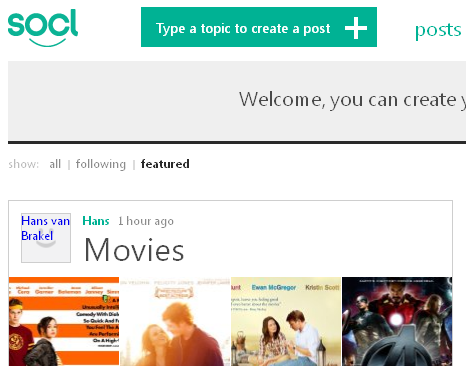
Microsoft Releases So.cl Network to the Public

Written By Unknown on Wednesday, 5 December 2012 | 05:27

so.cl-microsoft.PNG
Microsoft’s "experiment in open search", so.cl, is now open to anyone.

Launched back in May amidst very little fanfare, so.cl (pronounced "social") was initially offered only to students and billed as an experiment in learning.

Redmond has recanted those restrictions, today telling world+dog they’re free to pile in and enjoy the fun, as so.cl is now "a service where people connect over shared interests."

So.cl is rather unlike other social networks inasmuch as a post starts with a search. The results of that search can then be assembled into a post that brings together the user’s desired elements.

Many users post just a single image. Others take a more curatorial approach, collecting several images related to the same topic in a fashion not entirely unlike creating a Pinterest collection.

Redmond’s not building a walled garden, as Facebook is a permitted login mechanism and so.cl’s About page states it is not in competition with other social networks.

Socl — pronounced social — allows you to express and share your ideas through rich post collages comprised of images, links, captions and videos.
"Socl is a research project from Microsoft Research FUSE Labs and began as an experiment in social search targeted at students for the purpose of learning. Following the lead of the Socl community, Socl has since evolved to be a service where people connect over shared interests expressed through beautiful posts that take only seconds to create", says Microsoft.
Whether Redmond will be still be saying that if, or when, it embeds a so.cl tile in the default Windows 8 start screen remains to be seen.

Twitter goes down, company at work on solution

Written By Unknown on Thursday, 26 July 2012 | 09:24

Twitter is currently down.

The social network announced the outage on its Status page this morning, saying that "users may be experiencing issues accessing Twitter." The company didn't say what the issue might be, but did say that its "engineers are currently working to resolve the issue."

Years ago, as Twitter's growth skyrocketed, the service suffered from frequent outages. Over the last couple of years, however, most of those outages have subsided, save for a few brief outages from time to time. It's not clear how long this outage might last.

Top 5 Social Media Management Tools

Written By Unknown on Monday, 23 July 2012 | 11:55

So many statuses, so little time. As the popularity of social media continues to grow, so too do the number of networks to update and monitor. Whether you’re keeping track of personal Facebook and LinkedIn profiles or juggling 25 company Twitter accounts, it’s becoming tougher and tougher to keep up.

Luckily, tools to help you manage a growing social sphere are popping up just as frequently as new networks. Some work best for maintaining multiple accounts on one site while others consolidate your web presence across many networks. No matter what type of user you are, there’s likely a tool (if not several) that can make your online social life a little easier.

Here are some questions to consider before we start looking at potential solutions:

  • What are you trying to accomplish by using a social media management tool?
  • What (specifically) are you trying to measure?
  • How much do you care about your competitors?
  • What’s your budget?
If you have carefully answered this questions, don't read on to decide which social media management tool will suite you.

Choosing a Social Media Management Tool


Most of the tools below have options for every type of social media scenario that small and medium-sized businesses may encounter, but certain aspects of each tool are more robust than others. This is why you should have a clear goal in mind before evaluating your options, so you can choose the one that offers the tools that are most closely aligned with your objectives.

Crowdbooster


Social Media Management Tools for Business

Crowdbooster helps you achieve an effective presence on Twitter and Facebook. They show you analytics that aren't based on abstract scores but numbers that are connected to your business and your social media strategies: impressions, total reach, engagement, and more. Crowdbooster give you the tools and recommendations you need to take action and improve each one of these metrics.

SproutSocial


Social Media Management Tools for Business

SproutSocial is a social media management and monitoring platform known for its slick dashboard and its Messages view, which pulls in all of your activity from all networks into one stream.

Postling


Social Media Management Tools for Business

Postling provides an all-in-one dashboard for social media management across multiple platforms. They also provide listening and monitoring data from across the Web, including reviews sites like TripAdvisor and Yelp.

Raven Tools


Social Media Management Tools for Business

Raven Internet Marketing Tools provides a bit more than your standard social media management or monitoring platform because it also includes SEO and advertising components, all of which you can measure and analyze individually from within Raven’s dashboard.

Argyle Social


Social Media Management Tools for Business

Argyle Social helps organization participate in conversations with prospects and customers, drive brand awareness, and integrate social media deeply throughout your organization. And behind the scenes, they crunch social activity through their big data engine to provide the most actionable social intelligence.

Here are five social media management tools that can make your life easier. What do you use to keep track of multiple social accounts? Let us in the comments below.

Google Plus Open Beta With 9 New Features Including Search, Mobile Hangouts, And Open Signups

Written By Unknown on Tuesday, 20 September 2011 | 10:46

google-plus
Google+, the search giant's bid to boost its relevance in the socially networked world of the Web, is now open to the masses.

Google had required invitations to the service, since its debut as a "project" in June. But this morning, Google opened the doors of Google+ to all. Google+ has also graduated to being a "beta" product.

"We're nowhere near done, but with the improvements we've made so far we're ready to move from field trial to beta, and introduce our 100th feature: open sign-ups," Google Senior Vice President of Engineering Vic Gundotra wrote in a blog post. "This way anyone can visit Google.com/+, join the project, and connect with the people they care about."

Google also rolled out a host of new features to Hangouts, the videoconferencing service in Google+. Since its debut, the Hangout feature was limited to Google+ users on a PC, even though the social network was available as an application for devices running its Android mobile operating system as well as Apple's iOS.

Google is now making Hangouts available to mobile devices running Android version 2.3 and later that have front-facing cameras. And it says it will add mobile Hangouts to iOS devices "soon."

Google is also turning Hangouts into a broadcast medium. From launch, Google limited the number of participants in a Hangout to 10. The company is now letting "a limited number of broadcasters," likely those with the biggest Google+ followings, set up Hangouts On Air. The new feature still limits the number of participants to 10. But anyone can tune into a broadcast. The company is kicking off the service tomorrow night with a Hangout On Air featuring Black Eyed Peas member will.i.am.

And Google is giving users the ability to share their computer screens with others during Hangouts as well. Previously, users could watch a YouTube video together. Now, they can share computer screens to show off vacation photos, plan trips, collaborate on documents, or even scribble together on a new Sketchpad feature. And, as is Google's way with beta products, the company says it's testing the various features, which it expects to change over time.

"The extras are still under construction, but we wanted to preview these features and get your feedback sooner versus later," Gundotra wrote.
The company has also created application programming interfaces to let third-party software developers create their own applications that take advantage of Hangouts.

Google has also added search to Google+, a feature that had been surprisingly absent from the search giant's service until now. Users can type queries into the Google+ search box and get results from people and posts from the service as well as content from around the Web.

Using Facebook to ID people: How It was done

Written By Unknown on Monday, 8 August 2011 | 08:54

Carnegie Mellon's Alessandro Acquisti shows how to use Facebook to ID people on dating sites and on the street

Facebook's online privacy woes are well-known. But here's an offline one: its massive database of profile photos can be used to identify you as you're walking down the street.

A Carnegie Mellon University researcher today described how he assembled a database of about 25,000 photographs taken from students' Facebook profiles. Then he set up a desk in one of the campus buildings and asked willing volunteers to peer into Webcams.

The results: facial recognition software put a name to the face of 31 percent of the students after, on average, less than three seconds of rapid-fire comparisons.

In a few years, "facial visual searches may become as common as today's text-based searches," says Alessandro Acquisti, who presented his work in collaboration with Ralph Gross and Fred Stutzman at the Black Hat computer security conference.

As a proof of concept, the Carnegie Mellon researchers also developed an iPhone app that can take a photograph of someone, pipe it through facial recognition software, and then display on-screen that person's name and vital statistics.

This has "ominous risks for privacy" says Acquisti, an associate professor of information technology and public policy at the Heinz College at Carnegie Mellon University. Widespread facial recognition tied to databases with real names will erode the sense of anonymity that we expect in public, he said.

Another test compared 277,978 Facebook profiles (the software found unique faces in about 40 percent) against nearly 6,000 profiles extracted from an unnamed dating Web site.

About 1 in 10 of the dating site's members--nearly all of whom used pseudonyms--turned out to be identifiable.

Facebook isn't the only source of profile data, of course. LinkedIn or Google+ might work. But because of its vast database and its wide-open profile photos, Facebook was the obvious choice. (Facebook's privacy policy says: "Your name and profile picture do not have privacy settings.")

Facial recognition technology, which has been developing in labs for decades, is finally going mainstream. Face.com opened its doors to developers last year; the technology is built into Apple's Aperture software and Flickr. Google bought a face-recognition technology in the last few weeks, and Facebook's automated photo-tagging has drawn privacy scrutiny.

In the hands of law enforcement, however, face recognition can raise novel civil liberties concerns. If university researchers can assemble such an extensive database with just Facebook, police agencies or their contractors could do far more with DMV or passport photographs--something that the FBI has been doing for years. (The U.S. Army partially funded the Carnegie Mellon research.)

Acquisti is the first to admit that the technology isn't perfect. It works best with frontal face photos, not ones taken at an angle. The larger the database becomes, the more time comparisons take, and the more false-positive errors arise.

On the other hand, face recognition technology is advancing quickly, especially for nonfrontal photos. "What we did on the street with mobile devices today will be accomplished in less intrusive ways tomorrow," he says. "A stranger could know your last tweet just by looking at you."

Google + Cheat Sheet........Check it Out

Written By Unknown on Wednesday, 13 July 2011 | 11:00

Am really a big fan of Google+ and for that i've been looking for ways to understand every bit of it. I just discovered some awesome cheats I'll be sharing with you, and for those still clamoring for invite, it's now open to everyone. So lets go straight to G+ and explore some of this tricks.

Before we go on, my big thanks goes to Simon Lausten a Google+ users for sharing it. This sheet includes cheats you need to know to use Google+ like a pro.

googleplus-sheet
Another good thing is that this cheat has translated versions as well for International readers. Check them out and if you've not added me to your circle yet, please do.....

Google + Estimated to Attain 10 Million Users

Written By Unknown on Tuesday, 12 July 2011 | 09:22

google-plus.png
The new Google Social Network has been the hot discussion of tech bloggers around the world of which majority are taking side with Google+ to be the best alternative to Facebook and just now an analyst estimated Google+ to likely reach 10 million users.

Note: the figures did not come from Google, but from Paul of Ancestry.com, not Microsoft co-founder Paul Allen. He came up with an interesting tactics to calculate the number of Google+ members. Trust me it's fascinating.... just read on.

According to Paul.....,  I project that Google will easily pass 10 million users tomorrow and could reach 20 million user by this coming weekend if they keep the Invite Button available. As one G+ user put it, it is easy to underestimate the power of exponential growth.

My model is simple. I start with US Census Bureau data about surname popularity in the U.S., and compare it to the number of Google+ users with each surname. I split the U.S. users from the non-U.S. users. By using a sample of 100-200 surnames, I am able to accurately estimate the total percentage of the U.S. population that has signed up for Google+. Then I use that number and a calculated ratio of U.S. to non-U.S. users to generate my worldwide estimates. My ratio is 1 US user for every 2.12 non-U.S. users. That ratio was calculated on July 4th through a laborious effort, and I haven't updated it since. That is definitely a weakness in my model that I hope to address soon. The ratio will likely change over time.

Since I have been tracking this same cohort of surnames from my first day, I am able to accurately measure growth over time.

I am not claiming perfect accuracy, but I do think the model is sound. A quant has suggested a mathematical formula that I can use to calculate a range of Google users with a 99% level of accuracy, and one of my employees is working on that math now. I hope to include that in future models.

Here is one way to look at my model. Imagine the U.S. government in 2020 has no money left. I know that's hard to imagine, but stay with me. Imagine they wanted to conduct a 2020 census and subsequent decennial censuses with a degree of accuracy (let's say 95%) and to do it on a shoestring budget.

They had complete data for 2010 - the population and growth rates for every city and town in the country. To do 2020, they could just take a random sampling of 100 cities and towns across the U.S. that were representative and conduct the census JUST for those cities every 10 years. If those 100 cities averaged the same growth rates as the rest of the country, then their decennial censuses would be fairly accurate but very inexpensive. (Obviously the US example won't work and shouldn't be tried, since the purpose of the U.S. census is in part to determine Congressional representation - so a complete census must be done in the entire country.)

But my project is like that - a low-budget sampling. I have randomly selected 100 uncommon U.S. surnames and I am tracking the number of Google+ users with those names - updating my counts every 2-3 days. I am assuming that the growth in G+ users with those surnames is similar to the growth in G+ users with the other 150,000 or so surnames in the U.S. If I had resources to include 500 or 1,000 surnames in my sample, then I believe my model would be more accurate. But my time and budget available for this project are small, so it is what it is. And then I take the 2.12 - 1 non-US to US ratio to complete the calculations.
Honestly I can't remember any social network site climbing to such height at a very short period of time although we can't rule out the fact that they already have existing products which has solid user base and they will be leveraging from those angle as well.

Although there have been no response from Google to confirm this estimates, but if perchance they are true, then its only the creator that know the future of Facebook.

3 Best Social Network Sites Manager

Written By Unknown on Monday, 11 July 2011 | 06:18

Not until yesterday, I discovered few of my social network sites were half dead.... I know you might be surprised by what i said "half dead". I have received some friend request and few people have sent me messages which i have not replied for long. It was really annoying because i almost lost some vital stuff if i had not checked it yesterday.

So i had to search for an effective manager that i can use to access all my social network sites all at once, instead of signing into their individual accounts. Fortunately there were so many of them, i then decided to try 5 known ones and i came to conclusion that three out of the five were perfect at least for me and i'll be sharing them here with you so you wont have the hassle of searching for them.

Note: This list are randomly selected, so you can choose the last if you feel like.

Seesmic (Windows/Mac/Linux/Android/BlackBerry/iOS/Web, Free)

Seesmic started life as a social video aggregator and transformed into a social media management powerhouse. Available for nearly every operating system and mobile device under the sun, Seesmic makes it easy to keep tabs on your favorite services. All the versions of Seesmic support a core of social networking sites like Facebook, Twitter, and LinkedIn, but the desktop versions really shine with support for plugins that expand the support to over 50 services. Check out the plugin marketplace to see all the different add-on services.

Digsby (Windows/Mac/Linux, Free)

Originally a multi-protocol chat client, Digsby has expanded to include additional features such as email and social network support. You can now check status updates and send your own status updates on popular social networks like Twitter, Facebook, MySpace and LinkedIn. The InfoBox gives you updates on your friends as well as access to any invitations or announcements they send out. It's not quite the expansive dashboard provided by some of the other options in this week's Hive Five but it's more than powerful enough for many readers and it helps wrap up instant messaging, email, and social networking in one application.

TweetDeck (Windows/Mac/Linux/Android/iOS/Chrome, Free)

TweetDeck is another social media application that makes good use of a multi-column layout. You can easily customize TweetDeck to display just what you want to see including wall updates, Twitter mentions, and more. If you sign up for a free TweetDeck account you can also synchronize your settings and layout across computers. TweetDeck supports Facebook, Twitter, LinkedIn, MySpace, Google Buzz, and more. In addition to easy cross-network updates and monitoring, TweetDeck also supports schedules updates.

Do you have your own list? share with us through the comment box below.

Facebook Unveils Video Calling Powered by Skype

Written By Unknown on Wednesday, 6 July 2011 | 13:07

facebook
Facebook has unveiled a group chat tool, a new design for its overall chat interface, and, yes, a video calling service based on Skype.

"Video calling is the first example of what we think of as a great social app," Facebook chief executive Mark Zuckerberg said during a press event at the company's Palo Alto, California, headquarters. "The integration that we've done could not have been done without the great social infrastructure we've rolled out over the last five years," he said.

The group chat tool is based on Facebook's existing Groups setup, which is now used by about 50 per cent of all Facebookers, according to Zuckerberg. The new design includes a browser sidebar that provides quick access to those you chat with most, and it offers a "call" button that launches the video service.

The video service requires a plug-in, but you can place a call to your Facebook friends that will then send them a notice pointing them to the plug-in. The service does not offer group video calling, but Zuckerberg indicated that this will eventually be rolled into the service.

The service cannot be used to call existing off-Facebook Skype clients – or vice versa. But Skype product manager Mike Barnes said that the two companies will eventually provide such off-Facebook calling.

facebook
Zuckerberg unveils video calling on Facebook

Facebook has already started to roll the new tools across its site, and "millions" of users. Bates says that the video service will reach about one per cent of users on Wednesday. According to Skype CEO Tony Bates, the two companies have been working on the video service for the past six months.

In late June, Zuckerberg told a Seattle audience that Facebook would unveil something "awesome" today, and last week, Techcrunch reported that this would involve integrating the social network with the Skype VoIP service, which is now owned by Microsoft. Redmond is a Facebook investor and longtime Facebook partner. Microsoft's Bing underpins search on Facebook, and Facebook may be used to personalized your results on Bing. Microsoft announced in May it's buying Skype for $8.5bn.

Update: This story has been updated with additional information from Facebook's press event.

Google + Project: Finally Arrives, threathens Social Giants, Facebook

Written By Unknown on Tuesday, 28 June 2011 | 11:53

Googleplus
Google took its biggest leap yet onto Facebook’s turf on Tuesday, introducing a social networking service called the Google+ project — which happens to look very much like Facebook.

The service, which will initially be available only to a select group of Google users who will soon be able to invite others, will let people share and discuss status updates, photos and links.

But the Google+ project will be different from Facebook in one significant way, which Google hopes will be enough to convince people to use yet another social networking service. It is designed for sharing with small groups — like colleagues, college roommates or hiking friends — instead of with all of a user’s friends or the entire Web. It also offers group text messaging and video chat.

“In real life, we have walls and windows and I can speak to you knowing who’s in the room, but in the online world, you get to a ‘Share’ box and you share with the whole world,” said Bradley Horowitz, a vice president of product management at Google who is leading the company’s social efforts with Vic Gundotra, a senior vice president of engineering.

The debut of Google+ will test whether Google can overcome its past flops in social networking, like Buzz and Orkut, and deal with one of the most pressing challenges facing the company.

At stake is Google’s status as the most popular entry point to the Web. When people post on Facebook, which is mostly off-limits to search engines, Google loses valuable information that could benefit its Web search, advertising and other products.

Googleplus

Google+ may already be too late.

In May, 180 million people visited Google sites, including YouTube, versus 157.2 million on Facebook, according to comScore. But Facebook users looked at 103 billion pages and spent an average of 375 minutes on the site, while Google users viewed 46.3 billion pages and spent 231 minutes.

Advertisers pay close attention to those numbers, and to the fact that people increasingly turn to Facebook and other social sites like Twitter to ask questions they used to ask Google, like a recommendation for a restaurant or doctor, because they want more personalized answers.

Mr. Gundotra and Mr. Horowitz said that knowing more about individual Google users will improve all Google products, including ads, search, YouTube and maps, because Google will learn what people like and eventually be able to personalize those products.

“To think we could achieve Google’s stated mission of organizing the world’s information absent people would be ludicrous,” Mr. Horowitz said.

But Google has been criticized for failing to understand the importance of social information on the Web until competitors like Facebook and Twitter had already leapt ahead. Part of the blame, analysts say, falls on Google’s engineering-heavy culture, which values quantitative data and algorithms over more nuanced, touchy-feely pursuits like socializing.

Exhibit A is Buzz, a social sharing tool for Gmail users. It automatically included users’ e-mail contacts in their Buzz network, setting off widespread criticism that Google invaded users’ privacy and failed to understand that people’s e-mail contacts are not necessarily their friends.

Google quickly changed the service so it did not automatically connect friends. In March, Google settled with the Federal Trade Commission over charges of deceptive privacy practices related to Buzz and agreed to 20 years of audits.

Mr. Gundotra and Mr. Horowitz, both of whom worked on Buzz, say they were chastened by the experience. They said Google+ grew out of those mistakes, because they realized how much people care about controlling the information they share.

And unlike its approach with Buzz, which was tested only by Google employees before its broad introduction to the public, Google is calling Google+ a project to emphasize that it is not a final product, saying it will undergo many changes to fix problems and introduce new features. Still, its new Web site, plus.google.com, is Google’s most fully formed social networking tool yet.

Mr. Gundotra and Mr. Horowitz said they took pains to mimic people’s relationships in real life and eliminate the social awkwardness that things like friend requests and oversharing can generate on other sites.

Google+ users will start by selecting people they know from their Gmail contacts (and from other services, once Google strikes deals with them). They can drag and drop friends’ names into different groups, or circles, and give the circles titles, like “sisters” or “book club.”

Unlike on Facebook, people do not have to agree to be friends with one another. They can receive someone’s updates without sharing their own. Users can also view their Google+ page the way their friends see it, to ensure their bosses do not see pictures from Saturday night, for instance.

Google+ users will see a toolbar on top of any Google site they use, where they can click to share something or see updates from friends. Eventually, the toolbar could appear on other Web sites. Google+ will also improve the usefulness of other Google products that have not gained traction, like Latitude for sharing your location and +1 for giving a thumbs-up to a particular site in search results, the executives said.

When users visit their Google+ homepage, they see three columns and a stream of status updates in the middle that looks remarkably like Facebook. But Google said that besides an easier way to share with select groups, Google+ has several other features that distinguish it from competitors.

It offers high-definition group video chat, called Hangouts, that other members of a group can join as it is happening. Users can search a section called Sparks to see articles and videos from across the Web on certain topics, like recipes or Alzheimer’s disease, and share them with relevant groups of friends.

And on the Google+ mobile app for Android phones and iPhones, people can chat with groups using a feature called Huddle. Photos and videos shot with cellphones are automatically uploaded to a private album, so Google+ users can quickly view and post them from their phones or later on a computer.
huddle

With these services, Google will compete with a host of start-ups, like Path for sharing with small groups, SocialEyes for video chat, Flipboard for articles on certain topics and GroupMe for group texting.

“The notion that online sharing is broken is not an insight that is unique to us,” Mr. Horowitz said. “We have a way to bring in millions of users in a way that is challenging for a start-up.” 
Facebook Is Launching the iPad App In “Coming Weeks”

Written By Unknown on Wednesday, 15 June 2011 | 22:33

A Facebook app for the iPad is about to become a reality. Years after the Facebook iPhone app’s rollout in July, 2008, the company’s finally finished a tablet-optimized version, said to now be in the final stages of testing.

According to The New York Times, unnamed sources who have seen the new app say it has a “slick design that has been tailored for the iPad and its touchscreen interface.”

The sources also mentioned how Facebook Chat and Groups have been overhauled for the iPad, adding that the app will go beyond what the Facebook website can do, allowing users to take photos from the iPad and place them directly on Facebook. Those who’ve seen the app called the photo and video uploading capabilities “amazing, offering full-resolution and full-screen images.”

Facebook CEO Mark Zuckerberg apparently has changed his tune about the iPad. When asked if his company was developing an iPad app, he replied:

Facebook’s Secret iPhone Photo Sharing App

facebook iphone app
TechCrunch said Facebook's secret iPhone app "looks awesome" and "amazing," whereas most Android users would just be thankful for a Facebook app that actually works. Like some kind of amalgamation of Path, Instagram and Color, it does sound pretty hot.

Supposedly it's a standalone app at present, but Facebook might include it in the main iPhone app at a later date, and even roll the technology out into the browser-based Facebook too. As someone who regularly bangs her head against a brick wall every time she uploads a photo to Facebook, that'd do nicely, thanks.

TechCrunch is still sorting through the 50MB of data and photos that were leaked to them, so this one image is all we've got at the moment. But hopefully we'll be able to ascertain some more details about this groovy-sounding app once they upload some more, and figure out if Facebook's pulling out all the stops now that all these photo-sharing apps are trampling on its floor-space...or if it's a reaction to Apple baking Twitter so deeply into iOS 5. [TechCrunch]

Google rolls out +1 Button Internet-wide

Written By Unknown on Saturday, 4 June 2011 | 07:44

As expected, Google has begun the Internet-wide roll-out of its new +1 Button, a social sharing feature that rivals Facebook‘s “Like” button. The +1 Button is now available for all web publishers who wish to put the button on their website. And a number of news organizations, online retailers and other popular websites are already on board.

Like many other share buttons out there, +1 works with “a single click,” Google boasts, allowing people to tip off friends to cool articles, websites or products they like. Unlike other share features, however, +1 is fully integrated into Google search, so a “+1″ shows up next to a link in Google search results when that link has been shared by any of a user’s Google contacts. Not only that, but a particular search result receives a higher page ranking the more contacts share the link using +1.

“With a single click you can recommend that raincoat, news article or favorite sci-fi movie to friends, contacts and the rest of the world,” writes Google software engineer Evan Gilbert, who worked on +1, in a post on the Google blog. “The next time your connections search, they could see your +1′s directly in their search results, helping them find your recommendations when they’re most useful.”

For webmasters who wish to pop the +1 Button on their website, Google has created an easy-to-use web-tool that allows users to pick from a number of size and style options, so the +1 Button matches the right look for each site. Once a design is chosen, the publisher can then simply copy the automatically-generated JavaScript code and paste it into their site.

By making it easy to install +1 on a website, Google hopes to make the sharing feature as ubiquitous as Facebook’s “Like” button has become. Of course, it remains to be seen whether websites will take to +1. But since the service offers higher page ranking on Google as an incentive, we’re pretty sure many will at least give it a try.

Facebook caught exposing millions of user credentials

Written By Unknown on Wednesday, 11 May 2011 | 05:58

Facebook Tricks
Facebook has leaked access to millions of users' photographs, profiles and other personal information because of a years-old bug that overrides individual privacy settings, researchers from Symantec said.

The flaw, which the researchers estimate has affected hundreds of thousands of applications, exposed user access tokens to advertisers and others. The tokens serve as a spare set of keys that Facebook apps use to perform certain actions on behalf of the user, such as posting messages to a Facebook wall or sending RSVP replies to invitations. For years, many apps that rely on an older form of user authentication turned over these keys to third parties, giving them the ability to access information users specifically designated as off limits.

The Symantec researchers said Facebook has fixed the underlying bug, but they warned that tokens already exposed may still be widely accessible.

“There is no good way to estimate how many access tokens have already been leaked since the release [of] Facebook applications back in 2007,” Symantec's Nishant Doshi wrote in a blog post published on Tuesday. “We fear a lot of these tokens might still be available in log files of third-party servers or still being actively used by advertisers.”

While many access tokens expire shortly after they're issued, Facebook also supplies offline access tokens that remain valid indefinitely. Facebook users can close this potential security hole by changing their passwords, which immediately revokes all previously issued keys.

The flaw resides in an authentication scheme that predates the roll out of a newer standard known as OAUTH. Facebook apps that rely on the legacy system and use certain commonly used code variables will leak access tokens in URLs that are automatically opened by the application host. The credentials can then be leaked to advertisers or other third parties that embed iframe tags on the host's page.

“The Facebook application is now in a position to inadvertently leak the access tokens to third parties potentially on purpose and unfortunately very commonly by accident,” Doshi wrote. “In particular, this URL, including the access token, is passed to third-party advertisers as part of the referrer field of the HTTP requests.”

A Facebook spokeswoman said there is no evidence the weakness has been exploited in ways that would violate the social network's privacy policy, which steadfastly promises: “We never share your personal information with our advertisers.” Facebook on Tuesday also announced it was permanently retiring the old authentication routine.

Doshi, who was assisted by fellow researcher Candid Wueest, said there's no way to know precisely how many apps or Facebook users were affected by the glitch. They estimate that as of last month, almost 100,000 applications were enabling the leakage and that over the years “hundreds of thousands of applications may have inadvertently leaked millions of access tokens to third parties.”

Facebook over the years has regularly been criticized for compromising the security of its users, which now number more than 500 million. The company has rolled out improvements, such as always-on web encryption, although users still must be savvy enough to turn it on themselves, since the SSL feature isn't enabled by default.

As indicated above, all previously issued access tokens can be cleared by changing your Facebook password. Readers who aren't sure if they're affected might want to err on the side of security and update their password now. ®

10 Useful Hack Tricks for Business Facebook Fan pages

Written By Unknown on Tuesday, 26 April 2011 | 12:33

Facebook Pages are among the best ways to promote your product using the Social media. You can drive lots of visitors to your blog and also could market your product with small investment with the Facebook page. But just creating a Facebook page for your business is not going to promote your business after all, you should have to gather lots of loyal fans to your page and drive them towards the promotion of your product.

So for gathering the Fans for your Facebook page you have to make your page more interactive. In this post we have brought you 10 Cool Facebook Code Tricks for your Business Facebook Fan pages using the Static Fbml Facebook Application.

1. Embedding YouTube Videos

When you click the embed button below the video in YouTube, It will give you the embed code to put that video easily on your website or might be using some free plugin to easily embed youtube videos on wordpress blogs.

But in case of embedding YouTube video on Facebook page, the default embed HTML code doesn’t works. The video on Facebook can be only embedded using the lash. Copy-Paste the code below into the FBML box of your page to embed the video. Remember to replace VIDEO_ID with the YouTube Video ID before you save.
<fb:swf swfsrc=”http://www.youtube.com/v/VIDEO_ID” imgsrc=”http://img.youtube.com/vi/VIDEO_ID/default.jpg” width=”480″ height=”360″ />
2. Separate contents for Fans and non-fans

Showing Separate contents for the Facebook Page fans and non fans can also help you gain more fans for your page. You can use the FMBL below and show separate content for the fans and non-fans.
<fb:fbml version=”1.1″>
<fb:visible-to-connection>This part is visible for fans only!
<fb:else>This part is visible for non-fans</fb:else>
</fb:visible-to-connection>
</fb:fbml>
3. Invite to Friends box

Adding an Invite to Friend box below the main Content of your welcome Tab will also help you increase the fans of your page as it makes your fans easier to invite their friends on Facebook. Use the following code in FBML box  to insert the Invite box in your page.
<fb:request-form method=”post” type=”[your organization]” invite=”true” content=”Check out [your organization]<fb:req-choice url=’http://www.facebook.com/YOURPAGE’ ‘ label=’GO’ /> “>
<fb:multi-friend-selector actiontext=”Tell your friends about [your organization]” rows=”3″ showborder=”true” />
</fb:request-form>
</fb:request-form>
4. Adding a Comment Box

Adding a comment Box on your Facebook page or adding it below any featured product on your page makes your readers easy to comment on the specified product easily. You can use the  following code in the Fbml box to insert it in your page.
<fb:comments xid=”YOUR_PRODUCT_UNIQUE_ID” canpost=”true” showform=”true” candelete=”false” numposts=”3″ returnurl=”http://YOUR_PRODUCT_HOME_URL”>

</fb:comments>
5. Adding podcasts and MP3 Audios

Like YouTube videos you can also embed podcasts or any Mp3 Audio on your Fan page using the Fbml. You have to provide the direct link to the mp3 audio file or Podcast in the Fbml. Facebook will wrap them in their own player and make your fans listen to it easily.
<fb:mp3 src=”http://example.com/podcast.mp3″ title=”Our new Song” artist=”This Week in Facebook” />
6. Adding pop-up Dialog Box

The Pop-up dialog box is used to give the short description of the link with on a Popup dialog box whenever a user clicks a specified link in your fan page.

For instance,You have used pop-up box for the ‘About’ Link on your page then it will show the popup box as above when your fan click on the link and the ‘learn more’ link can be even redirected to your About page.
<fb:dialog id=”dialog” cancel_button=1>

<fb:dialog-title>About Us</fb:dialog-title>

<fb:dialog-content>Bloganol is a Blog About Tech, Social Media, Opensource and more.

Would you like to learn more?</fb:dialog-content>

<fb:dialog-button type=”button” value=”Yes” href=”http://www.bloganol.com/about” />

</fb:dialog>

<a href=”#” clicktoshowdialog=”dialog”>Click here</a> to learn more.
7. Adding Polls to the Page

Previously in our blog we have already published a post about Ultimate Tricks and applications to make your facebook page a masterpiece. On that post adding a poll on a Facebook Page was also included but it was using the direct Facebook application.

In this page we are talking about inserting Polldaddy polls on your fan page in a Tab using the Fbml. Copy-Paste the following Fbml to insert polldaddy polls on your Facebook fan page. Remember to replace POLL_ID with your Poll id from Polldaddy before you save.
<fb:swf swfsrc=’http://i.polldaddy.com/poll.swf?p=POLL_ID’  width=’250′ height=’500′ imgsrc=”poll-thumbnail.jpg” />
8. Inserting Flash Content

Inserting Flash Content on your Facebook page is also like inserting YouTube video in your Page. Use the Fbml to insert Flash content n your page. Use the Flash file URL in the swfsrc and use the image URL on imgsrc as the source of the image that is being displayed, before your flash.
<fb:swf swfbgcolor=”000000″ swfsrc=’http://domain.com/file.swf’ imgsrc=’http://domain.com/picture.jpg’ width=’760′ height=’920′ />
9. Adding a Chat Room

Adding a chat room on your Fan page enables you to chat with your Fans when they are on your page. Firs thing you need is to create a Flash based chat widget for your Facebook page using MeeboMe and then embed that Chat widget on your Facebook Fbml box usng the code below.

Remember to replace CHAT_ID with your widget chat Id provided by Meeome before you save the code.
<fb:swf swfsrc=’http://widget.meebo.com/mm.swf?CHAT_ID’  width=’515′ height=’425′ imgsrc=”chat-thumbnail.jpg” />
10. Adding a share button

A share button on your Facebook page lets your fan to share the provided link on their Facebook profile easily. You can use the following code on Fbml Box of your Page to insert the ‘Share’ button on your fan page.
<fb:share-button class=”meta”>
<link rel=”target_url” href=”http://yoururl.com”/>
</fb:share-button>

How to Avoid Facebook Viruses and Spam Messages

Written By Unknown on Monday, 25 April 2011 | 09:04

Facebook, the biggest social network with 500 million users, provides an interface to hit an unsuspecting crowd with malware and viruses. These viruses aren’t very difficult to detect if you are cautious enough. These Facebook viruses appear on your wall in forms of a bizarre or eye-catching stories and videos and once the user has clicked/liked the link, it is already late. The next step will be getting rid of your Facebook virus which is a time-consuming process. Its better to avoid spam messages and trojan viruses in the first place.

How to avoid it?

1. Think before you Act. Viruses on Facebook are sneaky. The hackers and cybercriminals who want your information know that Facebook users will often click on an interesting post without a moment’s thought. If a post sounds a bit over-the-top like a headline out of a tabloid, this is your first warning sign.

2. Try to avoid Links and videos with Catchy words like “funniest ever,” “most hilarious video on Facebook,” or “you’ve got to see this.” Do some keyword research to see if the post in question comes up in a search engine with information about a current virus or trojan.

3. Check the poster of the Suspicious content. If you receive a message from someone you do not know, this is an obvious red flag. Facebook video viruses also tend to pop up in your news feed or on your wall from friends you haven’t talked to in a while. Unfortunately, it’s likely this friend has already fallen victim to the latest virus on Facebook. After clicking on the story themselves, the message was sent out to all of their friends as well.


4 Avoid messages that have been posted by multiple users as the virus spreads among your friends who were not so cautious. If a link with title such as “Sexiest video ever” shows up all over your feed from all kinds of people (perhaps friends you would not expect to make such a post), this is another warning sign. Similar direct messages are a likely variant of the notorious Facebook Koobface virus which has used this approach in the past.

5. Do not fall for the “typical” money-transfer schemes. Chat messages from friends needing funds will usually sound suspicious. Everything can’t be screened before posting, so money transfer scams and hoax applications still find their way on to Facebook. You should also avoid applications that claim to do a full “Error check” or fix security problems related to your profile.

6. Update your anti-virus software frequently. If you do accidentally click on a post before realizing it is a hoax, do not click on any further links or downloads. If it’s too late and you have already been infected, the Facebook virus removal process may be effortless if you have a good anti-virus program to catch the virus, trojan or other malware early on.

What’s Next?

These were few important tips to safeguard your facebook account but your job isn’t done yet. Once you have detected that the link/post on your facebook wall is Malicious you should Mark it as SPAM so that the facebook support will stop it from spreading further and infecting other users.

If you have ever fallen victim of any such Malicious Scheme, please share your experience with all the users in form of comments so that others don’t fall victim of it.

Recent Facebook Hacks for 2011

This Facebook Hacks and Tricks will help improve your knowledge around the Facebook Platform. There are ways tech geeks use Facebook and with this Hacks and Tricks you will get to know how.

I have collected the Most Essential Hacks and Tricks of Facebook and presented them to you. I recently wrote about 24 Facebook tricks, you might consider reading that before this.

1.How to View the Album of Any User Even if it is Private

You can use this hack script to view a photo in the original album, even if you’re not friends with the person.

Get it Here

2. How to Remove Annoying Facebook Advertisement

Get rid of some of the Facebook advertising and sponsored by sections with this tool.

Get it Here

3. How to see Real Profiles from Public Pages

This hack script redirects to real profiles from the Facebook people pages (public profiles). There is a risk of an infinite redirect loop if not logged in, so be logged in.

Get it Here

4. How to Undo Facebook Changes

If you hate some or all of the new Facebook changes, undo them with these scripts and use what you liked previously.

Get it Here

5. How to View All the Photos from a Person

You can search for pictures of a Facebook member who has tight privacy settings and view all his/ her pictures without his/ her consent.

Get it Here


6. How to Find More Friends at Facebook

Suppose some of your friends have newly joined Facebook and you didn’t even knew. Use this hack and it will help you go through your friends’ friends list and find them out.

Get it Here

7. How to Share Files from Facebook

With this box widget, you can share files from your computer through Facebook. Isn’t this trick great?

Get it Here

8. How to Get a Job from Facebook

Looking for a job? This application gives Facebook users unique access to job information, networking opportunities and other career resources.

Get it Here


9. How to Tighten up the Privacy and still Maintain Communication Convenience

The Private Wall combines the best of both worlds of Facebook: online convenience and communication with more serious privacy settings.

Get it Here

10 How to Cheat Facebook Texas Hold em Poker

This is one of my Favorite hacks and that is why I have saved it for the last one. Using this software you can see the cards of any player and the advanced version of this software allows you to even add credits to your account for free, this trick is awesome and my peak of them all.

Get it Here

24 Great Facebook Tricks and Hacks

1. Hide Your Online Status From Selected Friends:

So you want to use Facebook chat but don’t want some people to see your online status? Simply open up the Facebook Chat and click on Friends List. Start creating a new list called BlockList.

Once the list is created, add those friends to the list that you want to appear offline to. When the list is complete, hover your mouse to the little green icon adjacent to the list and click Go Offline. Bingo! You will now appear offline to everybody in the BlockList.

2. View a Friend’s Profile Without Messy Applications:

If you are like me, you often get annoyed by the dozens of silly applications that people have added to their profile. Here’s a Grease Monkey script that allows you to view any profile without all those applications. Remember: the Mozilla Firefox web browser is a prerequisite for running Greasemonkey.

3. Display Your Facebook Status On Your WordPress Blog:

Want to display your Facebook status updates on your WordPress blog? There is a plugin that does exactly that. StatusPress lets you display your status updates to a widget on your WordPress blog.

4. Access Facebook Chat Through Your Desktop:

No need to go to Facebook.com if all you want to do is use Facebook chat. You can do it right from your desktop using clients like social.im , Adium or ChitChat.


5. Update Facebook Status From Firefox:

If you are a firefox addict you don’t need to use any other software to update your Facebook status. Simply install the FireStatus add-on and update your status right from your browser. You can also use the Facebook Toolbar to completely manage Facebook from your Firefox browser.

6. Create A Photo Collage From Pictures Of Your Facebook Friends:

Easily create a photo collage from profile pictures of all your Facebook friends using a simple Facebook app called Photo Collage.

7. Add A New friend But Hide It From Your Status Update:

A great tutorial by Tim Watson walks you through the process of hiding specific actions from your status updates.

8. Schedule Facebook Messages To Be Send Later:

If you want to schedule your Facebook messages to be send sometime in the future, Sendible is a great tool to do that. You can also use Sendible to schedule your status updates.

9. How To Share Flickr Photos On Facebook:

My Flickr is a Facebook application that lets you display your Flickr photos and photo sets on Facebook so your friends can view and comment on them without leaving Facebook.

10. How To Download Facebook Photo Albums:

Ever felt the need to download complete photo albums from Facebook. You can easily do it with either a Windows desktop application named FotoBounce or a great Firefox add-on FacePad.


11. Upload Photos On Facebook From Your Phone:

All the smart phones like iPhone and Blackberry make it simple to upload photos to your Facebook account but how would you do it if you have a regular phone? Here is a great tutorial to walk you through that.

12. Magic Circles On Facebook:

You might have heard about the Konami code that makes red blurry circles on your Facebook page. This might be one of the most popular Facebook hidden tricks. Here’s how to do it:
Press Up, Up, Down, Down, Left, Right, Left, Right, B, A, Enter key then press up & down & Magic circles will appear!
To stop them simply reload your page.


13. Use Your Facebook Like A Pirate:

Do you love talking like a pirate? You can set your Facebook to appear like a pirate page by going into Current Language Settings and setting it to English (Pirate).


14. How To Insert Cool Symbols In Your Status Updates:

Make your status updates interesting by inserting cool symbols. Simply copying them from this list and pasting in your status updates.


15. Automatically Poke Friends That Poke You:

Don’t have enough time to poke back friends who poke you on Facebook? Automate it with a Grease Monkey script called Facebook Autopoke.

16. Upload Photos From PicasaTo Facebook:

Upload photos to your Facebook account directly from Picasa using the Picasa app for Facebook. You can also upload the Picasa captions and resize your photos before uploading them to Facebook.

17. Search Facebook Like A Pro:

Not everybody knows how powerful Facebook search is. Similar to any large search engine, Facebook search has a lot of advanced options to help you search like a pro. For example if you are looking for a person named John Marsh and filter your results down to only people who are married, you can try name: John Marsh status:married. A complete list of search tips for Facebook can be found here.


18. How To Update Facebook Status From Gmail:

Facebook gadget for Gmail allows you to update your Facebook status right from your Gmail.


19. How To Access Gmail From Facebook:

If you seldom have to leave Facebook just to go check your Gmail inbox, check out Fmail. It is a great application that lets you check your Gmail from within your Facebook inbox.

20. See Facebook Twitter style:

If you love Twitter more than Facebook, you can view your Facebook just like you view your Twitter using this grease monkey script.

21. Import Facebook Friends To Twitter:

FB140 is a simple tool that lets you find all your Facebook friends that are using Twitter so you can easily follow them.

22. Access Facebook From Microsoft Outlook:

This is a great tip for people attending colleges or working in places that block Facebook, but allow you access to Microsoft Outlook. Simple install the FBlook plugin and access Facebook from Outlook.

23. Display Your Facebook Status Upside Down:

This is a cool and fun trick. To display upside down status updates, simply head over to FlipText and type in your status. Then simply click on Flip Text and copy-paste the upside down text into your Facebook status box.

24. Update Facebook Status Using Twitter:

Wouldn’t you love to update your status on both Facebook and Twitter at the same time. Just install the Twitter application for Facebook. Once synced, your tweets including the #fb tag would automatically be posted as status updates on your Facebook.

How To Edit Your Facebook Comment

Written By Unknown on Wednesday, 20 April 2011 | 07:01

After Facebook removed the “Comment” button, there was a clear risk of accidentally publishing unfinished comments as users are used to pressing “Enter” to start a new line, instead of using the key to submit their comment. Facebook took note of the concern, and added the option to edit your comment right after you posted it. They also added the instruction: “Press Shift+Enter to start a new line”.


So if you want to edit your message, click the X in the top right corner right after posting it. But be aware that the editing ability will disappear after half a minute, or as soon as somebody else comments after you. If that happens, pressing X will only allow you to remove your entire message.

Facebook Profile Photo Tag Hack

Along with the New Profile Page makeover launched last Sunday, Facebook introduced the Photostream; a set of the five most recent photos in which you’ve been tagged, prominently displayed at the top of your profile. You can activate it here if you haven’t yet, but here’s how it looks:

The photostream, also known as profile photo bar, has been added to show your friends what you’ve been up to lately. If some of these tagged photos bother you, you can always hide them by clicking the small “x” button in the top right corner of each picture. Be aware that hiding a photo from the stream only removes it from your profile page, but not from your “Photos of you” page. Nor does it untag you.

While most users will enjoy this new feature and leave it just the way it is, but i really love messing things up (most fellas call it tweaking).

Here are the instructions to execute the photo tags profile hack:
  1. Fire up your favorite image editor (this can be GIMP, Adobe Photoshop, or anything a slightly more advanced than MS Paint).
  2. Load an image of your choice (our site header was perfect for the job, because it was a wide rectangle).
  3. Resize its dimensions to 485 by 68 pixels (you might want to crop some unnecessary bits to make it look better)
  4. Now cut or crop the image into 5 pieces of 97 by 68 pixels each and save them (obviously, you can achieve this effect with 4, 3 or even just 2 images as well).
  5. Upload the five pieces to a Facebook album and start tagging yourself in reverse order. That means the part of the image that’s supposed to appear FIRST, should be tagged LAST. And you should start with the right end of the cut-up image. We’ve learned that it’s more accurate to tag yourself while viewing the album normally, instead of in Edit Album mode.
  6. If everything went well, you’ll have a new, awesome Facebook profile page header!
I also welcome any examples of how you abuse your photostream… or that of your friends!
 
Support : Creating Website | Johny Template | Mas Template
Copyright © 2011. Turorial Grapich Design and Blog Design - All Rights Reserved
Template Created by Creating Website Published by Mas Template
Proudly powered by Blogger