Latest Post
Showing posts with label Microsoft. Show all posts

Microsoft Office 2013 Activator

Written By Unknown on Friday, 15 March 2013 | 08:28


    Enjoy activating your office 2013 .It Activates VL version: with the activator and make it  full version.It will help you a lot to activate your office which has many advanced features than previous versions and its metro style is also an amazing feature of office 2013. If you like to have this just download it here


KMSpico v4.0 Setup & OEM Directory Portable Repack Version

 Today i thought of sharing KMSpico v4.0 Setup & OEM Directory Portable Repack Version with you. This is a software after KMSnano which works Similar but in a different way and easy way to activate your Microsoft Product. So try it and enjoy well
KMSpico v4 - is the ideal tool to activate the final version of Windows 7/8 and Office 2010/2013. Activator does not require user intervention, the entire activation process takes place in the background. You have to just run the activator and wait a couple of minutes to check the activation status of Windows and / or Office.
 
Features:
• Universal (Activates Windows Vista/7/8 Pro/Enterprise/N/VL and Office 2010/2013 Retail/VL.)
• Does not require user intervention (enough to run the activator).
• Activates both immediately and Windows and Office.
 
With KMSpico can:
• Activate Windows 8 Enterprise
• Activate Windows 8 Professional
• Activate Microsoft Office 2013
• Activate Microsoft Office Visio 2013
• Activate Microsoft Office Project 2013
• Activate Microsoft Office 2010
• Activate Microsoft Office Project 2010
• Activate Windows 7 Enterprise
• Activate Windows 7 Professional
• Activate Windows Vista Professional
 
- Requirements:
- Requirements: .NET 4.0 or Windows 8.
- Activates Windows Vista/7/8 and Office 2010/2013.
- Windows Server 2008/2008R2/2012
 
Instruction:
1. Run KMSpico.exe or RunTrigger.cmd
 
2. Done..
 
Based off of Microsoft Toolkit - Official KMS Solution for Microsoft Products 2.4.1.
 
Change Log v4:
  • Add Service: Service KMSELDI, it run every 2 hours a random KMSEmulator with random ePID and reactive local products.
  • Complete silent after the firts run.
Recommendations:
- Disable SmartScreen.
- Disable microsoft security updates.
- Make exceptions to %programfiles%\KMSnano in Antivirus.


Please Keep in mind it activates only Volume License VL Version not RTM Version.

Windows 7 activator

Written By Unknown on Friday, 8 February 2013 | 08:52


Yes guys and gals…..Now u can make your win7. genuine within a few clicks……
Follow the steps  given below :-

Click on the link given below


  • Now just shut ur firewalls and run this small utility with administrator rights
  • and now…..u’ve to just click on the “REMOVE WAT” button and within a few minutes your windows will be made genuine…..
  • Microsoft Essential Download (Offline Update)

    Written By Unknown on Friday, 25 January 2013 | 09:44


    Update Microsoft Security Essentials Offline


    Image representing Microsoft as depicted in Cr...Image via CrunchBase


    For getting the latest update definitions for Microsoft Security Essentials from Microsoft for free, visit the following links given below.


    Download the appropriate Microsoft Security Essential update files 32bit or 64bit, and if you’re using Windows Vista or Windows 7, right click Mpam-fe.exe file [for 64bit it’s nis_full.exe], click Run as administrator to install the latest updates. [If you’re Windows XP, just double click the file to install the updates]

    Do the same procedure for updating other PC’s with Microsoft Security Essentials offline.

    Security Tools from Microsoft

    Written By Unknown on Thursday, 17 January 2013 | 11:46


    Security Tools for IT Pros 

    Security management tools and technologies that enable IT Pros to assess vulnerabilities and strengthen security across the organization.

    Most Popular

    Microsoft Baseline Security Analyzer (MBSA)

    An easy-to-use tool that provides a streamlined method to identify missing security updates and common security misconfigurations.

    Malicious Software Removal Tool

    This tool checks your computer for infection by specific, prevalent malicious software and helps to remove the infection if found. Updated versions released second Tuesday of each month.

    Featured

    Microsoft Security Compliance Manager Tool (SCM)

    An end-to-end Solution Accelerator which will help you plan, deploy, operate, and manage your security baselines for Windows client and server operating systems, and Microsoft applications.Download

    UrlScan Security Tool

    This tool helps prevent potentially harmful requests from reaching the server by blocking specific HTTP requests. Download

    Microsoft Assessment and Planning Toolkit

    This is an agentless, automated, multi-product planning and assessment tool for quicker and easier desktop, server and cloud migrations. Download

    Enhanced Mitigation Experience Toolkit

    This tool allows users to manage Security mitigation technologies on their system making it more difficult for an attacker to exploit vulnerabilities in a given piece of software. Download

    Related Tools

    Source-

    Hack Windows RT to Run any Desktop App

    Written By Unknown on Tuesday, 8 January 2013 | 02:36

    microsoft-surface
    The security mechanism preventing unauthorised software running on ARM-powered Windows RT tablets - such as Microsoft's Surface slabtops - can be easily defeated.

    The Redmond giant wanted only cryptographically signed executables, ideally those obtained from the official Windows application store, to run on its hardware. But, we're told, by twiddling a byte of memory in the Windows kernel, it is possible to disable the protection system and allow any code to run on the system.

    Taking full control of the device, effectively jail-breaking the computer to run any desktop or touch-driven ARM-compatible software, is an exercise left to the user.

    A security researcher calling him or herself C. L. Rokr claims to have found an oversight in the Windows kernel to allow this to happen. According to Rokr, all you have to do is fire up the Windows Debugger software with Administrator-level permissions, connect it to the tablet and manipulate the device's kernel memory.

    Specifically, one needs to inject a blob of ARM code into a safe spot of RAM and have the Windows RT kernel divert the processor momentarily to run these instructions. This code locates and alters a moderately hidden variable in the kernel to disable the executable signature check. On PCs the variable contains '0' allowing any program to run, whereas it is '8' on Windows RT devices to enforce the signature check.

    Trivially overwriting this byte can therefore change the level of protection on the system and circumvent Microsoft's cryptographic keys.

    You can read more about the hack along with a how-to guide here.

    Windows RT, which is a straight-up ARM port of Windows 8 for portable computers, was built to only run apps that are signed using a Microsoft-issued certificate.

    The hack is unlikely to be something most non-techie users could pull off as it requires knowledge of WinDbg. And modifying the operating system could fall foul of the device's secure boot protection, which refuses to start the OS if it has been altered.

    It's also not clear which apps can be run, although as pointed out in this programming forum the software must be compiled for, or otherwise be compatible with, ARM-powered systems. Programs already built for Intel and AMD processors need not apply, therefore.

    Windows RT can be found on Microsoft's Surface tablet and fondleslabs from companies including Asus and Samsung. So far it appears sales of Windows RT devices are low and below Microsoft's expectations. Redmond has quickly turned from only selling Surface itself online and in its stores to recruiting retail partners.

    One reason for the lack of interest could be lack of apps. Windows RT has been deliberately locked down because, we're told, Microsoft wants to maintain a standard of performance and security, and to ensure apps conform to the design of the interface and input via touch. This means the number of Windows RT apps is far behind the number of apps that exists for Intel machines running the exact same operating system.

    Devices using Windows RT come with some built-in apps including Office Home and Student 2013 RT Preview Edition and Mail, Messaging and SkyDrive, but the official way to obtain more is via Microsoft's Windows Store, which supplies suitably signed executables.

    Microsoft Releases So.cl Network to the Public

    Written By Unknown on Wednesday, 5 December 2012 | 05:27

    so.cl-microsoft.PNG
    Microsoft’s "experiment in open search", so.cl, is now open to anyone.

    Launched back in May amidst very little fanfare, so.cl (pronounced "social") was initially offered only to students and billed as an experiment in learning.

    Redmond has recanted those restrictions, today telling world+dog they’re free to pile in and enjoy the fun, as so.cl is now "a service where people connect over shared interests."

    So.cl is rather unlike other social networks inasmuch as a post starts with a search. The results of that search can then be assembled into a post that brings together the user’s desired elements.

    Many users post just a single image. Others take a more curatorial approach, collecting several images related to the same topic in a fashion not entirely unlike creating a Pinterest collection.

    Redmond’s not building a walled garden, as Facebook is a permitted login mechanism and so.cl’s About page states it is not in competition with other social networks.

    Socl — pronounced social — allows you to express and share your ideas through rich post collages comprised of images, links, captions and videos.
    "Socl is a research project from Microsoft Research FUSE Labs and began as an experiment in social search targeted at students for the purpose of learning. Following the lead of the Socl community, Socl has since evolved to be a service where people connect over shared interests expressed through beautiful posts that take only seconds to create", says Microsoft.
    Whether Redmond will be still be saying that if, or when, it embeds a so.cl tile in the default Windows 8 start screen remains to be seen.

    Free ebook: Introducing Windows 8: An Overview for IT Professionals (Final Edition)

    Written By Unknown on Thursday, 15 November 2012 | 22:41

    Free ebook: Introducing Windows 8: An Overview for IT Professionals (Final Edition)

    Get a headstart evaluating Window 8—guided by a Windows expert who’s worked extensively with the software since the preview releases. Based on final, release-to-manufacturing (RTM) software, this book introduces new features and capabilities, with scenario-based insights demonstrating how to plan for, implement, and maintain Windows 8 in an enterprise environment. Get the high-level information you need to begin preparing your deployment now.

    Topics include:

    • Performance, reliability, and security features
    • Deployment options
    • Windows Assessment and Deployment Kit
    • Windows PowerShell™ 3.0 and Group Policy
    • Managing and sideloading apps
    • Internet Explorer® 10
    • Virtualization, Client Hyper-V, and Microsoft Desktop Optimization Pack
    • Recovery features
    Source -

    Microsoft Surface Priced: 32GB For $499 Without Touch Cover, $599 With; 64GB For $699

    Written By Unknown on Tuesday, 16 October 2012 | 09:27

    Microsoft's Surface tablet pricing has been outed by the software giant.

    Earlier today, Surface pricing was posted on the Microsoft Store online site. Not long after, the page was taken down, seemingly because the pricing information was put up on the site before it was supposed to go live.


    Based on that screenshot, it appears Microsoft will sell its Surface with Windows RT for a starting price of $499 with 32GB of storage and a Touch Cover. Those who want a Touch Cover included in the order will need to set aside $599 for the device. Adding an additional 32GB of storage will push the Surface's price up to $699.

    Microsoft unveiled its Surface tablet earlier this year. The RT version comes with a 10.6-inch screen and a 1,280 x 720 resolution. The device is expected to be Wi-Fi-only, and its Touch Cover add-on works as a screen protector, stand, and keyboard. Surface for Windows 8 Pro is expected to launch after the Windows RT version, and will come with a "full HD" 1080p screen resolution. That device will likely be more expensive than the Windows RT model.

    Windows 8 is scheduled to launch on October 26. Windows RT, which will be running on the Surfaces leaked on the store site, will run on ARM processors. Microsoft will also sell Windows 8, Windows 8 Pro, and Windows 8 Enterprise versions. Those models are not compatible with ARM-based chips.

    German Goverment Urges Everyone to Stop Using Internet Explorer

    Written By Unknown on Wednesday, 19 September 2012 | 03:09

    Following the recent bug  that was discovered in Internet Explorer 6, Internet Explorer 7, Internet Explorer 8 and Internet Explorer 9 which makes PC's vulnerable to attack by hackers, the German government advised the public on Tuesday to stop using the browser temporarily.


    The security flaw, which affects hundreds of millions of Internet Explorer browser users around the globe, publicly surfaced over the weekend.

    Microsoft had said on Monday that attackers can exploit the bug to infect the PC of somebody who visits a malicious website and then take control of the victim's computer.

    The German government's Federal Office for Information Security, or BSI, said that it was aware was aware of targeted attacks and that all that was needed was to lure web surfers to a website where hackers had planted malicious software that exploited the bug in Internet Explorer to infect their PCs.

    "A fast spreading of the code has to be feared," the German government said in its statement.

    BSI advised all users of Internet Explorer to use an alternative browser until the manufacturer has released a security update.

    Officials with Microsoft did not respond to a request for comment on the move by the German government.

    The company late on Monday urged customers to install a piece of security software as an interim measure, buying it time to fix the bug and release a new, more secure version of Internet Explorer.

    Microsoft did not say how long that will take, but several security researchers said they expect the update within a week.

    The free security tool, which is known as the Enhanced Mitigation Experience Toolkit, or EMET, is available through an advisory on Microsoft's website: blogs.technet.com/b/msrc/

    The EMET software must be downloaded, installed and then manually configured to protect computers from the newly discovered threat, according to the posting from Microsoft. The company also advised customers to adjust several Windows security settings to thwart potential attackers, but cautioned that doing so might impact the PC's usability.

    Some security experts had said it would be too cumbersome for many PC users to implement the measures suggested by Microsoft. Instead they advised Windows users to temporarily switch from Internet Explorer to rival browsers such as Google Inc's Chrome, Mozilla's Firefox or Opera Software ASA's Opera.

    Internet Explorer was the world's second-most widely used browser last month, with about 33 percent market share, according to StatCounter. It was close behind Chrome, which had 34 percent of the market.

    Microsoft Secure Boot Firmware may Block Linux Booting

    Written By Unknown on Wednesday, 21 September 2011 | 08:14

    Windows-8-Linux
    Computer scientists warn that proposed changes in firmware specifications may make it impossible to run “unauthorised” operating systems such as Linux and FreeBSD on PCs.

    Proposed changes to the Unified Extensible Firmware Interface (UEFI) firmware specifications would mean PCs would only boot from a digitally signed image derived from a keychain rooted in keys built into the PC. Microsoft is pushing to make this mandatory in a move that could not be overridden by users and would effectively exclude alternative operating systems, according to Professor Ross Anderson of Cambridge University and other observers.

    UEFI is a successor to the BIOS ROM firmware designed to shorten boot times and improve security. The framework, a key part of Windows 8, is designed to work on a variety of CPU architectures.

    If the draft for UEFI is adopted without modification, then any system that ships with only OEM and Microsoft keys will not boot a generic copy of Linux. A signed version of Linux would work, but this poses problems, as tech blogger Matthew Garrett explains.

    Garrett writes:

    Firstly, we'd need a non-GPL bootloader. Grub 2 is released under the GPLv3, which explicitly requires that we provide the signing keys. Grub is under GPLv2 which lacks the explicit requirement for keys, but it could be argued that the requirement for the scripts used to control compilation includes that. It's a grey area, and exploiting it would be a pretty good show of bad faith.

    Secondly, in the near future the design of the kernel will mean that the kernel itself is part of the bootloader. This means that kernels will also have to be signed. Making it impossible for users or developers to build their own kernels is not practical. Finally, if we self-sign, it's still necessary to get our keys included by ever OEM.

    There's no indication that Microsoft will prevent vendors from providing firmware support for disabling this feature and running unsigned code. However, experience indicates that many firmware vendors and OEMs are interested in providing only the minimum of firmware functionality required for their market.

    Garrett concluded that there is no need to panic just yet.

    The upshot of the changes is that considerable roadblocks might be placed in the way of running alternative operating systems on PCs. Anderson describes this as a return to the rejected Trusted Computing architecture – which at that point involved force-feeding DRM copy-protection restrictions – which may be far worse than its predecessor.

    The professor said:

    These issues last arose in 2003, when we fought back with the Trusted Computing FAQ and economic analysis. That initiative petered out after widespread opposition. This time round the effects could be even worse, as 'unauthorised' operating systems like Linux and FreeBSD just won’t run at all. On an old-fashioned Trusted Computing platform you could at least run Linux – it just couldn’t get at the keys for Windows Media Player.

    The extension of Microsoft’s OS monopoly to hardware would be a disaster, with increased lock-in, decreased consumer choice and lack of space to innovate.

    Anderson concludes that the technology might violate EU competition law in a rallying call on Cambridge University's Light Blue Touchpaper blog here.

    Windows 8 to come with built-in Malware Protection

    Written By Unknown on Thursday, 15 September 2011 | 04:50

    windows-8
    Microsoft's next version of Windows will ship with "tons of security features," including one that automatically scans boot drives for malware and a revamped version of the Windows Defender antivirus program, company executives said.

    At the company's BUILD conference in Anaheim, California on Tuesday, Corporate Vice President of Windows Planning and Ecosystem Michael Angiulo demonstrated an early version of Windows 8 that automatically scanned an infected USB drive used to boot the next generation operating system. Before the OS was able to load, the computer stopped the process and displayed a warning that the boot volume contained an "invalid signature" indicating it had been compromised.

    He was able to get the valid version of Windows to load by turning off the system and turning it back on. The presentation starts around the 1:08 mark in the following video:


    The technology making this possible is known as UEFI, short for Unified Extensible Firmware Interface. A successor to the BIOS ROM firmware that Microsoft operating systems have relied on since their beginning, UEFI was designed to shorten the time it takes a PC to start up. It was built by Intel, but is designed to work with a variety of CPU architectures.

    "It's not just about speed and having a boot that looks better," Angiulo said during Tuesday's keynote, referring to UEFI. "It's about security, too."
    Steven Sinofsky, president of Microsoft's Windows and Windows Live division, went on to say that Windows 8 developers "have taken Defender and we've actually built a whole new range of protection, all the way up though antimalware, antivirus." Users are free to run Defender or security software supplied by another company. In all, the new OS will offer "tons of security features," he added.

    The company issued a statement Wednesday saying Windows 8 would include "low-level security features such as Secured Boot to help defeat classes of threats, and user facing features including Windows Defender and SmartScreen" spam-filtering. The statement didn't elaborate.

    Windows 8 will also offer a new way to log on to PCs equipped with a touchscreen. Sam Bowne, a security instructor at San Francisco City College, provided a screenshot here that describes the feature this way: "You choose the picture – and the gestures you use with it – to create a password that's uniquely yours."

    Bowne and his students have been testing the security features in the new Windows beta, according to a source.

    "There is built in antivirus, and it works!" he wrote "It stopped not only thr EICAR test file, but more than a dozen malware items in Metasploit. So it might be time to sell your Symantec stock."

    Windows 8 Developer Preview

    win8-start-screen
    Those of you interested in taking the current flavor of Windows 8 for a spin can now download and install the Developer Preview edition.

    Being demoed at Microsoft's Build conference, the Developer Preview is a prebeta version showing off the operating system at its current stage. Though technically designed for developers, no registration is required, so anyone can download and install it.

    The Windows 8 Preview is being offered in three different packages--a 64-bit version with various developer tools, a 64-bit version of just the operating system, and a 32-bit version of the OS.

    All three come as ISO files--image files of the contents of a CD or DVD. Since each of the packages is several gigabytes in size, you'll need a DVD if you want to burn the files to a disc.

    In Windows 7, you can burn the ISO file to a DVD by double-clicking it to open the Windows Disc Image Burner. For older operating systems, you can use a tool such as ISO Recorder to burn the file. Alternatively, you can use such utilities as Virtual CloneDrive or Daemon Tools to "mount" the ISO file as a drive, eliminating the need to burn it onto a disc.

    Since this is a prebeta version, you'll want to install the OS on a spare PC or in a virtual environment so that it doesn't interfere with your production or work machine.

    Those of you who want to know what you're getting into before you attempt to install the Developer Preview can check out a hands-on early look at Windows 8.

    What's next after the Developer Preview?

    Speaking at the Build conference yesterday, Steven Sinofsky, senior vice president of Microsoft's Windows division, said that Windows 8 will next segue into one beta version, followed by one Release Candidate. Assuming all goes well, we can then expect the final RTM (release to manufacturing) edition sometime after that.

    Sinofsky didn't reveal a specific timeframe for the beta or Release Candidate. However, the company has been expected to launch the beta at the 2012 Consumer Electronics Show in January, according to WinRumors.

    Microsoft promises faster startup for Windows 8, Boots in 8 seconds

    Written By Unknown on Friday, 9 September 2011 | 04:31

    window8-interface
    Are you the sort of person who prefers to shut your PC down at the end of the day rather than hibernate it or put it to sleep, but do you still want to the system to start up fast? Windows 8 has a new feature that will be of great interest to you.

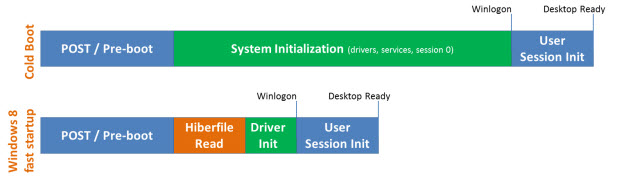
    The feature is called ‘fast startup mode’ and it is a hybrid between a standard cold boot and restoring your PC from a hibernated state. How does it work? Gabe Aul, director of program management in Windows, explains over on the Building Windows 8 blog:

    The key thing to remember though is that in a traditional shutdown, we close all of the user sessions, and in the kernel session we close services and devices to prepare for a complete shutdown.

    Now here’s the key difference for Windows 8: as in Windows 7, we close the user sessions, but instead of closing the kernel session, we hibernate it. Compared to a full hibernate, which includes a lot of memory pages in use by apps, session 0 hibernation data is much smaller, which takes substantially less time to write to disk. If you’re not familiar with hibernation, we’re effectively saving the system state and memory contents to a file on disk (hiberfil.sys) and then reading that back in on resume and restoring contents back to memory. Using this technique with boot gives us a significant advantage for boot times, since reading the hiberfile in and reinitializing drivers is much faster on most systems (30-70% faster on most systems we’ve tested).

    How much faster is this than a standard cold boot? Take a look at this:


    Here’s how fast startup is different to a traditional cold boot:


    The speed of the handoff between POST and Windows depends on whether the system has a traditional BIOS or the newer Unified Extensible Firmware Interface (UEFI) … so watch out for the sales pitch for new systems:

    One thing you’ll notice in the video was how fast the POST handoff to Windows occurred. Systems that are built using Unified Extensible Firmware Interface (UEFI) are more likely to achieve very fast pre-boot times when compared to those with traditional BIOS. This isn’t because UEFI is inherently faster, but because UEFI writers starting from scratch are more able to optimize their implementation rather than building upon a BIOS implementation that may be many years old. The good news is that most system and motherboard manufacturers have begun to implement UEFI, so these kinds of fast startup times will be more prevalent for new systems.

    And here it is in action:


    The notebook used in that video is an EliteBook 8640p (Intel Core i7-2620M, 8GB, 160GB SSD).

    PC Revolution from the Beginning (Photos)

    Written By Unknown on Thursday, 11 August 2011 | 06:38

    The original IBM 5150, the personal computer that helped launch an industry, made its debut at a press conference at the Waldorf Astoria Hotel in New York on August 12, 1981.

    Photo by IBM

    A marketing photo of the IBM 5150 illustrated how the company wanted to push the new personal computer into the workplace.

    Photo by IBM

    Don Estridge, later called "the father of the PC," led the team at IBM that developed the 5150, the personal computer that sparked the PC revolution.

    Photo by IBM

    An advertisement for the IBM 5150 noted: "IBM believes that the age of the personal computer has arrived."

    Photo by Computer History Museum

    IBM sped up development of the 5150 personal computer, worried about the encroachment of the popular Apple II into homes and businesses.

    Photo by Computer History Museum

    IBM turned to a young company, Microsoft, and its co-founders Paul Allen and Bill Gates, for the operating system for the 5150. This photo was shot shortly after Microsoft signed the contract with IBM. The image was featured in the Seattle Business Journal's October 19, 1981 article, "Building on success, Microsoft owners shoot for $100 million target."

    Photo by Microsoft

    An advertisement for MS-DOS 1.0, the operating system that got its start on the IBM 5150 and was used on the so-called clone PCs.

    Photo by Microsoft

    IE, Windows server bugs is likely to be exploited soon

    Written By Unknown on Wednesday, 10 August 2011 | 07:35

    microsoft-logo
    Microsoft has released 13 updates that patch security holes in a wide range of its software offerings, including vulnerabilities rated critical in its Internet Explorer browser and Windows server operating systems.

    The bugs in IE make it possible for attackers to remotely execute malicious code when an end user does nothing more than visit a booby-trapped website. Although there's no evidence the vulnerabilities are being exploited in the wild now, members of Microsoft's security team said there was a high likelihood reliable exploit code would be developed by real-world attackers in the next 30 days.

    The vulnerabilities affect all supported versions of the Microsoft browser, including versions 8 and 9, which were rebuilt from scratch to minimize the damage that can be done when hackers identify vulnerabilities.

    The second critical update covers all versions of Windows Server 2003 and Windows Server 2008, including the most recent R2 iteration, which is regarded as one of Microsoft's most secure server operations systems ever. By setting up a malicious DNS server and getting a vulnerable system to query it from inside the victim's network, an attacker can take complete control of the underlying machine.

    According to Microsoft's exploitability index for August, attackers aren't likely to exploit the DNS flaw in the next month.

    The remaining 11 patches carry the lower-level ratings of important and moderate and affected products including Windows, Office, .Net, and Visual Studio. Vulnerable components include the Remote Desktop Web Access Login, Microsoft Chart Web Control, and the Report Viewer Web control. The vulnerabilities enable attacks involving information theft and and denial of service outages.

    Roundups of this month's Patch Tuesday offerings from Microsoft and SANS are here and here. Commentary from Kaspersky Lab and Qualys is here and here.

    Window Server 8: Preview by Microsoft

    Written By Unknown on Wednesday, 13 July 2011 | 10:24

    microsoft
    Microsoft has given a peek into Windows 8 Server, the successor to Windows Server 2008 R2 and companion to the tablet-tastic Windows 8 client.

    The company is reported Tuesday to have boasted Windows 8 Server will pack more than 100 new features.

    Speaking at its Worldwide Partner Conference (WPC), however, Microsoft seems to have zeroed in on just one: the new Hyper-V it's positioning as an enabler of cloud computing when used to virtualize server

    operating systems and applications in your data center.

    Microsoft's teaser came in the shadow of virtualization giant VMware's vSphere 5 launch in San Francisco, California, on the same day.

    There, VMware chief executive Paul Maritz – a former Microsoft exec with 14 years at the company – boasted that according to various industry analysts VMware virtual machines are about six months away from running 50 per cent of the world's server workloads.

    Microsoft is coming from behind in virtualization, and claimed at WPC in Los Angeles, California, that HyperV is the fastest growing virtualization stack.

    Cutting to the features at WPC, Microsoft unveiled Hyper-V Replica that will let you replicate virtual machines either immediately or according to a schedule. This will, Mary-Jo Foley reports, let you do something like replicate a mission-critical database to an offsite data vendor.

    Microsoft claimed it will be vendor-agnostic and support different storage, data center and software and service providers. In keeping with Microsoft's goal of getting customers to put more of their data in its cloud by not charging for imports, Microsoft will also give Windows Server 8 users unlimited replication without an additional fee per virtual machine.

    Hyper-V, meanwhile, will also support more than 16 virtual processors per machine.

    Microsoft called Windows 8 Server "the next step in private cloud computing".

    Microsoft backed the cloud play by talking planned software that'll unify management of apps running on virtualized Windows servers and on Microsoft's Windows Azure cloud.

    It announced Systems Center 2012, which will feature an account controller that gives single sign-in to all your apps on different servers, and that provides a tiled view of apps. You will be able to deploy apps using a set of best practices. Systems Center 2012 is due to ship this year.

    On the apps front, Microsoft dressed an announcement about a third test build for the next version of SQL Server, codenamed Denali, with a demo of the ability to suck in data from the Windows Azure Data Market to the new database. It did this while showing off what it called "PowerPoint for data" that lets you customize and re-size data fields and turn them into charts and graphs by simply clicking and tugging at them using your mouse.

    The Data Market is an online data store with pre-built integration for SQL Server, Office and Bing.

    Microsoft, meanwhile, said that finished applications are now available for sale on the Windows Azure Marketplace - there are 578 offerings. Announced in November, the Marketplace, which includes the data Market, was originally a place for sharing data.

    Source: The Register

    Internet Explorer 10: Microsofts Unveils Preview of It's New Features

    Written By Unknown on Thursday, 30 June 2011 | 10:24

    Microsoft has released another preview version of Internet Explorer 10, and it has used the occasion to once again explain how it loves the enterprise more than Firefox.

    On Wednesday, the company released the second platform preview of IE 10 featuring what it called the "HTML5 engine" behind recent demos of the browser on Windows 8.

    According to Microsoft's corporate vice president in charge of IE, Dean Hachamovitch said, the IE10 platform preview means that developers can start working with several "site-ready" HTML5 technologies. Like so many others, Microsoft uses HTML5 as an umbrella term that applies not-only to the still gestating HTML5 standard but also other standards such as JavaScript and CSS.

    The IE10 platform preview offers support for CSS3 Positioned Floats, HTML5 Drag-drop, File Reader API, and Media Query Listeners and initial support for HTML5 Forms. Microsoft has also added support for an HTML5 sandbox for iframe isolation.

    Much of this is designed to work with the tiled and touch-friendly interface that arrives with the version of Windows 8 for tablets. CSS3 Positioned Floats lets text flow around figures on a page, and it builds on the support for CSS3 grid, multi-column, and flexbox in the first platform preview in April. It's the kind of thing you'd want on any touchy tablet.

    Then Hachamovitch alluded to last week's Firefox controversy.

    Last week, Mozilla handed Microsoft an easy avenue of attack when it killed support for Firefox 4 following the release of Firefox 5. This is typically the way it works, except that Firefox 5 is the first Mozilla browser delivered on the outfit's new rapid release cycle. It arrived just months after the release of Firefox 4. When one enterprise user piped up to say how this made life very hard for his kind, Mozilla man Asa Dotzler, told him to get over it, saying Mozilla has never, and should never, care about the needs of the enterprise.

    Announcing the IE10 preview, Hachamovitch played up Microsoft's long-term support for IE, coupling IE10 with the lifecycle of the forthcoming Windows 8. "Because of this approach to productizing Web technologies, Microsoft will support IE10 for 10 years after its release, honoring the same product lifecycle commitments as Windows itself," Hachamovitch said.

    Microsoft has traditionally supported each version of IE for as long as it supports the version of Windows it was built for. With IE9 on Windows 7, support for the browser is due to run until 2020 according to Microsoft. If Windows 8 and IE10 are delivered next year, as is expected, then you can expect Microsoft's IE10 support to run until roughly 2022.

    Office 365: Microsoft finally Releases Office 365

    Written By Unknown on Tuesday, 28 June 2011 | 12:02

    office365
    Today, at media events around the world, Microsoft Corp. announced the availability of Microsoft Office 365, the company’s newest cloud service. Office 365 is now available in 40 markets, and it brings together Microsoft Office, Microsoft SharePoint Online, Microsoft Exchange Online and Microsoft Lync Online in an always-up-to-date cloud service, at a predictable monthly subscription.

    The service was introduced in beta last year with enthusiastic response and, in a few months, more than 200,000 organizations signed up and began testing it. Businesses using Office 365 are already reporting impressive results and reducing IT costs by up to an estimated 50 percent while boosting productivity.

    Today, more than 20 service providers around the globe also shared plans to bring Office 365 to their customers this year. Bell Canada, Intuit Inc., NTT Communications Corp., Telefonica S.A., Telstra Corp. and Vodafone Group Plc, among others, will package and sell Office 365 with their own services for small and midsize businesses.

    “Great collaboration is critical to business growth, and because it’s so important, we believe the best collaboration technology should be available to everyone,” said Microsoft CEO Steve Ballmer. “With a few clicks, Office 365 levels the playing field, giving small and midsize businesses powerful collaboration tools that have given big businesses an edge for years.”

    A Game Changer for Businesses of All Sizes

    Office 365 is available in a wide range of service plans designed to meet the needs of businesses of all sizes, ranging from the largest to the smallest.

    With Office 365, people can stay on the “same page” using instant messaging and virtual meetings with people who are just down the hall or across the world. They can work on files and documents at the same time and share ideas as easily as they can share calendars. Office 365 gives people new ways to work together with ease, on virtually any device.

    Microsoft Office applications are at the heart of Office 365. Microsoft Word, PowerPoint, Excel, OneNote, Outlook and other Office applications connect to Microsoft Exchange, SharePoint and Lync to deliver a world-class solution for communication and collaboration.

    “When I saw Office 365, I knew this was the way businesses would work in the future,” said Elia Wallen, owner of fast-growing temporary housing provider Travelers Haven. “With Office 365, I’m going to save $100,000 a year and cut 30 hours of work a day across my 35 employees, but most importantly, my team is going to be able to work together better — no matter where they are.”

    More stories from businesses that have tried Office 365 are available at http://www.microsoft.com/casestudies.

    Office 365 Partners

    Microsoft is building a massive partner ecosystem around Office 365, including systems integrators, software vendors, resellers and other partners. Today, that ecosystem is expanding as the company partners in new ways with market-leading service providers. These companies will package Office 365 with their own services — from Web hosting and broadband to finance solutions and mobile services — and bring those new offerings to millions of small and midsize businesses globally.

    “Our partners represent some of the best-known, most-trusted brands in their local markets,” said Kurt DelBene, president, Microsoft Office Division. “Our customers will be able to rest easy knowing their cloud services are backed by Microsoft and some of the greatest service providers in the world.”

    A list of Office 365 service provider partners is available here.

    About Office 365

    Office 365 offers a range of service plans for a predictable monthly price from $2 to $27 per user per month. With Office 365 for small businesses, customers can be up and running with Office Web Apps, Microsoft Exchange Online, Microsoft SharePoint Online, Microsoft Lync Online and an external website in minutes, for $6 (U.S.) per user, per month. These tools put enterprise-grade email, shared documents, instant messaging, video and Web conferencing, portals, and more at everyone’s fingertips.

    Office 365 for enterprises has an array of choices, from simple email to comprehensive suites to meet the needs of midsize and large businesses, as well as government organizations. Customers can now get Microsoft Office Professional Plus on a pay-as-you-go basis with cloud-based versions of the industry’s leading business communications and collaboration services. Each of these plans comes with the advanced IT controls, innovative security technologies, 24/7 IT support and reliability customers expect from Microsoft.

    Availability

    Office 365 for small businesses and Office 365 for enterprises are available now. Businesses can try Office 365 for free for 30 days by signing up at http://www.office365.com or from their local Microsoft partner. Follow Office 365 on Twitter (@Office365), Facebook (http://www.facebook.com/office365) and the Office 365 blog at http://community.office365.com for the latest information.
     
    Support : Creating Website | Johny Template | Mas Template
    Copyright © 2011. Turorial Grapich Design and Blog Design - All Rights Reserved
    Template Created by Creating Website Published by Mas Template
    Proudly powered by Blogger